5 min read | 17 Mar 2026

When to use Xero reminders for chasing invoices (and when to upgrade)

Stylized halftone image of a mountain peak with a beige sky
  • Published

  • 17 March 2026

  • Author

  • Anna Turner-Major

Xero invoice reminders take minutes to set up and are a good first step towards a process for chasing invoices. This covers how to use Xero invoice reminders and when to upgrade to a system like Trove.

Divider

What are Xero invoice reminders?

Xero invoice reminders are automated emails sent to customers when invoices are approaching their due date or become overdue. Once enabled, Xero automatically sends these reminders based on the schedule you set up.


The system checks daily (between 4am and 8am in your organisation's timezone) and sends reminders to any invoices that meet your chasing criteria.

How to set up invoice reminders in Xero

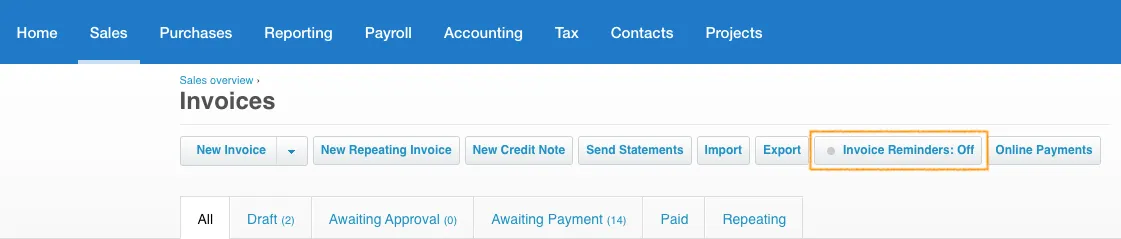
  1. Log into Xero and go to Sales → Invoices. At the top right of the page, you will see a button saying ‘Invoice reminders: Off’:
xero reminders
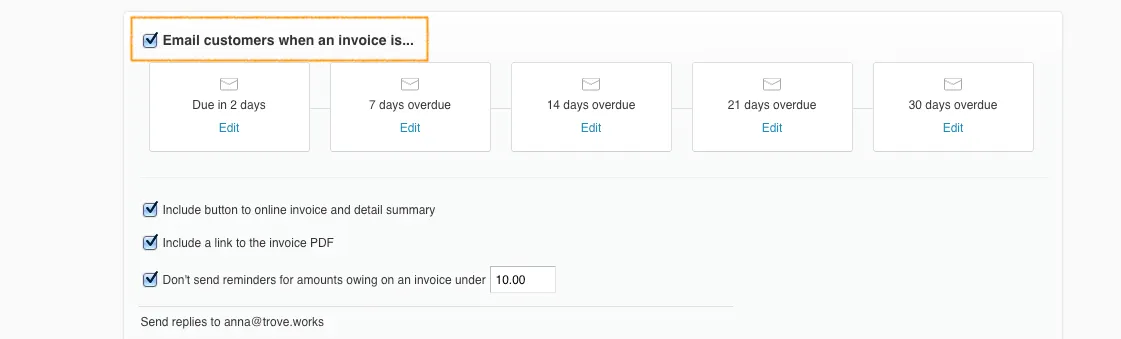
  1. Click on that button and then tick the box that says ‘Email customers when an invoice is...’. This will open editing and you can start configuring which reminder emails you want to send when:
invoice is overdue
  1. These are the settings to customise for your email sequence:
    1. Number of reminders in sequence (up to 5)
    2. When reminders are sent
    3. Reminder content and placeholders
    4. Attachments (e.g. PDF or online link to the invoice)
    5. Threshold for size of invoice before you start sending reminders (£0 is fine)


You can always start with the default Xero sequence and tweak it if no one replies.
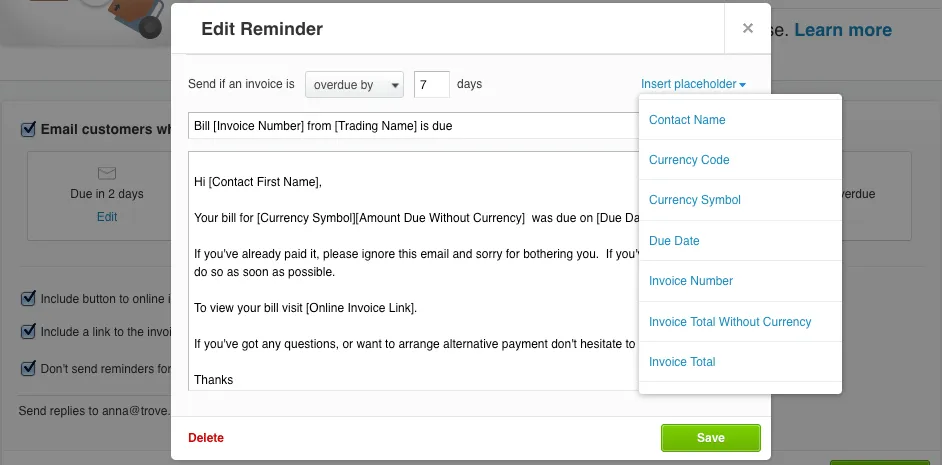
email reminder
  1. Hit save. You now have a sequence of email reminders ready to go and the first batch will be sent between 4am and 8am tomorrow.

When to use Xero’s invoice reminder system

Most Xero users would benefit from turning on an invoice reminder system and Xero’s built-in functionality is free to use on most plans. Here’s a quick sense check of whether to turn it on:


✅ When to use Xero’s invoice reminder system

  • You send out more than 10 invoices a month using Xero
  • You currently have at least 2 invoices that are overdue
  • Your number of overdue invoices is increasing each month
  • You have no process in place yet for chasing unpaid invoices


There are circumstances when you might need a more advanced system than Xero’s invoice reminders. Here are some reasons you may want to upgrade:


❌ When not to use Xero’s invoice reminder system

  • Customers receive multiple invoices each month (Xero sends a separate email per invoice which can be hard to keep track of)
  • You have sensitive or high-value customers who you would prefer to personally email
  • You have a diverse customer base where different customers need different reminder types
  • You use Xero’s system at the moment and still have lots of overdue invoices


If this sounds like you, upgrading to a system like Trove can help.

Extra features to help you get paid on time

Trove is a flexible system that gives you the tools to get every invoice paid on time. Here’s a feature comparison table to look at Xero vs Trove:

Feature

Xero

Trove

Why

Xero invoices are the source of truth

You need one source of truth for invoicing so smooth integration is key

Regular reminders when invoices are due

This is the core of a solid credit control process

Advance reminders about upcoming due dates

Gives the client more time to pay by nudging them ahead of the due date

Sender email address

Xero email address

Your own email

Avoid being spam filtered and keep communication with customers personal

Number of reminders

Max 5

Unlimited

The ability to add more reminders allows consistent chasing for a longer period

Send regular statements to customers

-

If you send multiple monthly invoices to the same customer, a statement is easier

Customise recipients for chasing emails

-

Escalate reminders to more senior clients later in your reminder schedule

Multiple different workflows

-

If you have a diverse customer base, enrol different customers in different workflows

Integrate with Slack and MS Teams

-

Keep the whole team up to date on what’s happening with collections

Escalate to debt recovery

-

Quickly escalate to debt recovery if your emails are being ignored

When to upgrade your collections system

Most Trove customers upgrade after turning on Xero reminders and seeing their overdue balance continue to increase. That’s when it’s time to roll out a more sophisticated process for collections.


To show what’s possible with Trove, all Xero users can access a 30-day trial of Trove that takes five minutes to get going. You can get going with your free trial here or book a demo if you want to take a look at the platform first.


Divider

Recent articles

Trove

Collect your treasure

© Trove Data Ltd, Company Number 16234512 registered in England & Wales, 2025

5 min read | 17 Mar 2026

When to use Xero reminders for chasing invoices (and when to upgrade)

Stylized halftone image of a mountain peak with a beige sky
  • Published

  • 17 March 2026

  • Author

  • Anna Turner-Major

Xero invoice reminders take minutes to set up and are a good first step towards a process for chasing invoices. This covers how to use Xero invoice reminders and when to upgrade to a system like Trove.

Divider

What are Xero invoice reminders?

Xero invoice reminders are automated emails sent to customers when invoices are approaching their due date or become overdue. Once enabled, Xero automatically sends these reminders based on the schedule you set up.


The system checks daily (between 4am and 8am in your organisation's timezone) and sends reminders to any invoices that meet your chasing criteria.

How to set up invoice reminders in Xero

  1. Log into Xero and go to Sales → Invoices. At the top right of the page, you will see a button saying ‘Invoice reminders: Off’:
xero reminders
  1. Click on that button and then tick the box that says ‘Email customers when an invoice is...’. This will open editing and you can start configuring which reminder emails you want to send when:
invoice is overdue
  1. These are the settings to customise for your email sequence:
    1. Number of reminders in sequence (up to 5)
    2. When reminders are sent
    3. Reminder content and placeholders
    4. Attachments (e.g. PDF or online link to the invoice)
    5. Threshold for size of invoice before you start sending reminders (£0 is fine)


You can always start with the default Xero sequence and tweak it if no one replies.

email reminder
  1. Hit save. You now have a sequence of email reminders ready to go and the first batch will be sent between 4am and 8am tomorrow.

When to use Xero’s invoice reminder system

Most Xero users would benefit from turning on an invoice reminder system and Xero’s built-in functionality is free to use on most plans. Here’s a quick sense check of whether to turn it on:


✅ When to use Xero’s invoice reminder system

  • You send out more than 10 invoices a month using Xero
  • You currently have at least 2 invoices that are overdue
  • Your number of overdue invoices is increasing each month
  • You have no process in place yet for chasing unpaid invoices


There are circumstances when you might need a more advanced system than Xero’s invoice reminders. Here are some reasons you may want to upgrade:


❌ When not to use Xero’s invoice reminder system

  • Customers receive multiple invoices each month (Xero sends a separate email per invoice which can be hard to keep track of)
  • You have sensitive or high-value customers who you would prefer to personally email
  • You have a diverse customer base where different customers need different reminder types
  • You use Xero’s system at the moment and still have lots of overdue invoices


If this sounds like you, upgrading to a system like Trove can help.

Extra features to help you get paid on time

Trove is a flexible system that gives you the tools to get every invoice paid on time. Here’s a feature comparison table to look at Xero vs Trove:

Feature

Xero

Trove

Why you need it

Scheduled reminders when invoices are due

✅ Included

✅ Included

This is the core of a solid credit control process

Advance reminders about upcoming due dates

✅ Included

✅ Included

Gives the client more time to pay by nudging them ahead of the due date

Sender email address

Xero email address

Your own email address

Avoid being spam filtered and keep communication with customers personal

Number of reminders

Maximum 5

Unlimited

Chase slow payers consistently for a longer period

Send regular statements to customers

-

✅ Included

A statement makes it easier to keep track if there are multiple overdue invoices

Escalate reminders to senior stakeholders

-

✅ Included

Escalate reminders to more senior clients later in your reminder workflow

Multiple different workflows

-

✅ Included

If you have a diverse customer base, enrol different customers in different workflows

Integrate with Slack and MS Teams

-

✅ Included

Keep the whole team up to date on what’s happening with collections

Automatically add late fees and payment plans

-

✅ Included

Apply late payment policies automatically to nudge clients to pay

Escalate to debt recovery

-

✅ Included

Quickly escalate to debt recovery if your emails are being ignored

When to upgrade your collections system

Most Trove customers upgrade after turning on Xero reminders and seeing their overdue balance continue to increase. That’s when it’s time to roll out a more sophisticated process for collections.


To show what’s possible with Trove, all Xero users can access a 30-day trial of Trove that takes five minutes to get going. You can get going with your free trial here or book a demo if you want to take a look at the platform first.

Divider

Customer not paying?

Take the right action every time with Trove.

credit card icon

Propose payment plan

sparkles

Draft reply

money icon

Apply late payment fee

calendar icon

Schedule monthly statement

... and more

Book a demo

Divider

Recent articles

Trove

Collect your treasure

© Trove Data Ltd, Company Number 16234512 registered in England & Wales, 2025

5 min read | 17 Mar 2026

When to use Xero reminders for chasing invoices (and when to upgrade)

Stylized halftone image of a mountain peak with a beige sky
  • Published

  • 17 March 2026

Author Image
  • Author

  • Anna Turner-Major, CEO & Co-founder

Xero invoice reminders take minutes to set up and are a good first step towards a process for chasing invoices. This covers how to use Xero invoice reminders and when to upgrade to a system like Trove.

Divider

What are Xero invoice reminders?

Xero invoice reminders are automated emails sent to customers when invoices are approaching their due date or become overdue. Once enabled, Xero automatically sends these reminders based on the schedule you set up.


The system checks daily (between 4am and 8am in your organisation's timezone) and sends reminders to any invoices that meet your chasing criteria.

How to set up invoice reminders in Xero

  1. Log into Xero and go to Sales → Invoices. At the top right of the page, you will see a button saying ‘Invoice reminders: Off’:
xero reminders
  1. Click on that button and then tick the box that says ‘Email customers when an invoice is...’. This will open editing and you can start configuring which reminder emails you want to send when:
invoice reminder
  1. These are the settings to customise for your email sequence:
    1. Number of reminders in sequence (up to 5)
    2. When reminders are sent
    3. Reminder content and placeholders
    4. Attachments (e.g. PDF or online link to the invoice)
    5. Threshold for size of invoice before you start sending reminders (£0 is fine)


You can always start with the default Xero sequence and tweak it if no one replies.

email reminder
  1. Hit save. You now have a sequence of email reminders ready to go and the first batch will be sent between 4am and 8am tomorrow.

When to use Xero’s invoice reminder system

Most Xero users would benefit from having an invoice reminder system and Xero’s built-in functionality is free to use on most plans. Here’s a quick sense check of whether to use it:


✅ When to use Xero’s invoice reminder system

  • You send out more than 10 invoices a month using Xero
  • You currently have at least 2 invoices that are overdue
  • Your number of overdue invoices is increasing each month
  • You have no process in place yet for chasing unpaid invoices


There are circumstances when you might need a more advanced system than Xero’s invoice reminders. Here are some reasons you may want to upgrade:


❌ When not to use Xero’s invoice reminder system

  • High invoice volume per customer: Xero sends an email per invoice which can get confusing
  • Sensitive or high-value customers: Often these customers expect an email from your team not Xero
  • Diverse customer base: Different customers or revenue streams can need different reminders
  • Multiple contacts on a customer: Xero auto-chases all contacts on a customer when you might only want to email accounts@
  • ... or simply because you use Xero today and your overdue balance is still increasing


If this sounds like you, upgrading to a system like Trove will help.

Extra features to help you get paid on time

Trove is a flexible system that gives you the tools to get every invoice paid on time. Here’s a feature comparison table to look at Xero vs Trove:

Feature

Xero

Trove

Why you need it

Scheduled reminders when invoices are due

✅ Included

✅ Included

This is the core of a solid credit control process

Advance reminders about upcoming due dates

✅ Included

✅ Included

Gives the client more time to pay by nudging them ahead of the due date

Sender email address

Xero email address

Your own email address

Avoid being spam filtered and keep communication with customers personal

Number of reminders

Maximum 5

Unlimited

Chase slow payers consistently for a longer period

Send regular statements to customers

-

✅ Included

A statement makes it easier to keep track if there are multiple overdue invoices

Escalate reminders to senior stakeholders

-

✅ Included

Escalate reminders to more senior clients later in your reminder workflow

Multiple different workflows

-

✅ Included

If you have a diverse customer base, enrol different customers in different workflows

Integrate with Slack and MS Teams

-

✅ Included

Keep the whole team up to date on what’s happening with collections

Automatically add late fees and payment plans

-

✅ Included

Apply late payment policies automatically to nudge clients to pay

Escalate to debt recovery

-

✅ Included

Quickly escalate to debt recovery if your emails are being ignored

When to upgrade your collections system

Most Trove customers upgrade after turning on Xero reminders and seeing their overdue balance continue to increase. That’s when it’s time to roll out a more sophisticated process for collections.


To show what’s possible with Trove, all Xero users can access a 30-day trial of Trove that takes five minutes to get going. You can get going with your free trial here or book a demo if you want to take a look at the platform first.

Customer not paying?

Take the right action every time with Trove.

Propose payment plan

Draft reply

Apply late payment fee

Schedule monthly statement

... and more

Book a demo

divider

Recent articles