
The problem: Xero sends payment reminders to every email on a contact record
Xero’s reminder system is structured so that it sends an email to every single email address stored on the Xero contact. In practice, this can lead to problems.
Here’s an example
Your company provides a cleaning service to 10 restaurants in the same group (Smith’s).
In Xero, you set up Smith’s as one contact with 11 emails - one per restaurant and one for HQ. Each month, you invoice each of the 10 restaurants separately, choosing the right recipient from the ‘To’ field in Xero and hitting send.
One of the restaurants - Smith’s Brasserie - starts to pay late and so you turn on Xero invoice reminders to chase them after 10 days.
On day 10, you get an angry email from Smith’s Brasserie. They have been emailed about their late payment, but so have all 10 other Smith’s email addresses stored in Xero.
Here’s what happened:
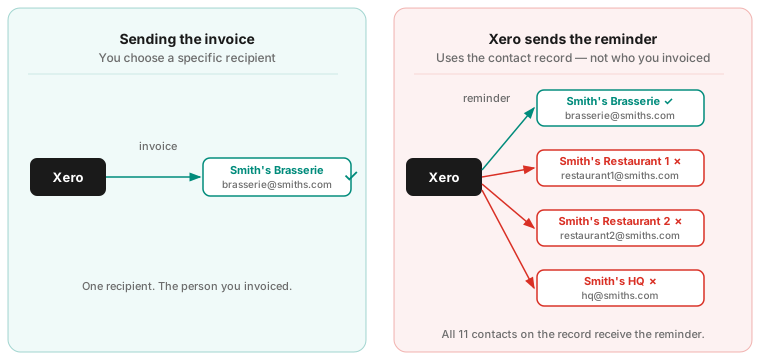
The Brasserie staff are angry about being shown up in front of their colleagues.
Their colleagues are angry about irrelevant emails.
And you are angry because Xero did the wrong thing.
A common complaint within Xero
This is a common complaint about Xero’s automatic reminder system. When you start working with bigger or more complex customers, the reminder system can be limiting.
Here are a few other examples we have seen at Trove:
-
A training company that invoices their customer’s employees separately for training: Each invoice was sent to the individual employee. They wanted email reminders sent to each individual employee as well.
-
A mechanic working for a car manufacturer with multiple plants: For accounting purposes, the manufacturer was kept as one customer in Xero but each plant needed separate invoices and payment reminders.
-
A benefits company that invoices different departments within the same company separately: Again for accounting purposes, the benefits company wanted to have one customer record in Xero but send (and chase) separate invoices to HR, Finance, Sales etc.
A few fixes you can make inside Xero
What you can improve
There are a few things you can do to reduce the problem, though none of them fully solve it.
1. Audit your contact records Go to Contacts > Customers and review who is listed for each client. Uncheck “Include in emails” for anyone who shouldn’t be receiving payment reminders. This does not directly solve the issue but will at least stop you accidentally spamming all contacts with payment reminders.
2. Turn off reminders for specific customers If you have sensitive or high-value clients you’d rather chase manually, you can disable automated reminders for them entirely within their contact record. This prevents the wrong-person problem for those clients, at the cost of having to manage them yourself.
3. Turn off reminders for specific invoices Within the “Awaiting Payment” tab, you can select individual invoices and choose “Turn off invoice reminders” from the More menu. Useful for one-off situations, but not scalable if the problem is widespread.
Xero’s core limitation
What you can’t do in Xero is tell the reminder system to follow the specific email address you used when sending the invoice. That link simply doesn’t exist in Xero’s architecture.
The reminder and the invoice are, in effect, two separate things.
Using Trove to solve Xero reminder limitations
Trove is the only software designed to tackle this problem specifically. Using Trove, you can assign invoices to specific email addresses. Then all reminders about that invoice are sent to the chosen contact only.
This can be done automatically or manually. Any other contacts on the same Xero customer are not chased. This solves the core limitation within Xero. You can start a free 30-day trial here or book a demo to see it in action.
“We had always struggled with Xero’s automated email function, as we invoice multiple clients within the same organisation. This app has allowed us to assign email addresses to individual invoices, which has made the process far more efficient. I would highly recommend it to any organisation facing the same issue.”
Daisy Docherty, Head of Finance, GTR - May 2026. Read full review
The bottom line
Xero’s invoice reminder system is a good starting point. It’s free on most Xero plans, quick to set up, and will recover a meaningful number of overdue invoices on autopilot. But it’s built around contact records rather than invoice recipients, and that creates a structural problem for anyone with complex client relationships.
The fixes available inside Xero can reduce the problem but not eliminate it. For businesses where this is a recurring issue, a dedicated tool is usually the cleaner solution.
If you want to see how Trove handles contact routing compared to Xero’s native system, the 30-day trial takes about five minutes to set up and connects directly to your existing Xero account.