

Xero is built for small and medium-sized businesses which means it’s not optimised for multi-entity groups. This can mean each entity slowly ends up with a different set of finance processes. Xero add-ons like Mayday solve this problem for reconciliation and month-end in multi-entity groups. Trove fixes this for credit control in multi-entity groups.
Invoicing a customer that’s several companies, rather than running several yourself? That’s a different setup: see parent customers in Xero.
Summary
- The short answer: Xero stores each entity as a separate organisation with no shared credit control, so a group can end up with as many different chasing processes as it has entities. Trove is a Xero add-on that runs one process across all of them.
- What Xero can do: each entity in Xero has its own separate aged receivables report that can be viewed and downloaded.
- What Xero can’t do: there’s no way to share a reminder schedule, template, or workflow across multiple Xero organisations and no group-level view of aged receivables.
- How Trove does it: build a workflow once and clone it to each organisation so every entity runs the same process, customisable per company and all under one login.
- Shared process, separate brand: each entity still sends from its own email address and branding, so customers never receive the wrong email from the wrong company.
Why a group ends up with inconsistent credit control
Xero is built around the single organisation. Each company you run is its own Xero file with its own settings. There’s no concept of a parent group that sets the rules for everyone underneath. This is because Xero is designed for smaller businesses who usually only have one entity.
What happens in practice is that credit control develops differently in each business. One entity has someone diligent who chases weekly. Another has nobody who owns it. A third has reminders switched on but nobody reads the replies. The group CFO can’t get an overall view of what’s going on anywhere.
What Xero can and can’t do
Xero will let you switch between entities under one login. You can do this from the top left of the screen where it says the name of the organisation you are currently in:

This makes it easier to view and download aged receivables reports quickly from Xero. Go to Reporting > Aged Receivables Summary to view each one:
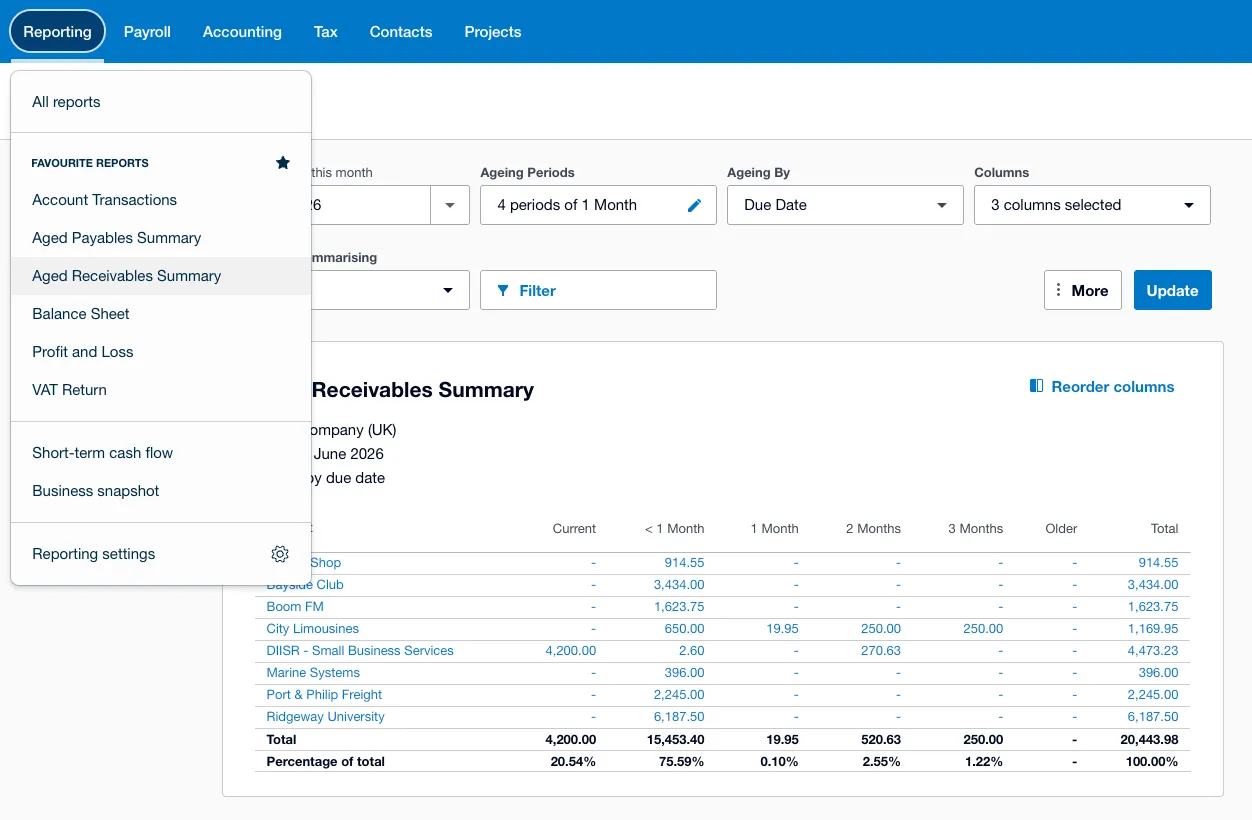
This shows you what is oldest and therefore the highest priority for chasing. Our guide to reading the Xero aged receivables report covers what to do with each bucket.
In terms of a synchronised process for chasing, you can also turn on Xero’s built-in reminders, but you have to turn these on separately for each entity and copy/paste templates between them. If you are looking for a way to ensure credit control is consistent between your entities and get a group-level view of what’s going on per entity, this is not possible within Xero.
Building a consistent credit control process across entities in a group
The way to fix this is a credit control layer that connects to each of your Xero entities and lets you manage them together.
You can do that within Trove with the following steps:
- Add each company as its own entity under one umbrella group
- Build your chasing workflow once, in one entity, the way you want it: the timing, the wording, the escalation
- Clone that workflow into the other entities (see screenshot below)
- Once it’s cloned, you can still customise it per company if one business needs a different escalation step or fewer reminders
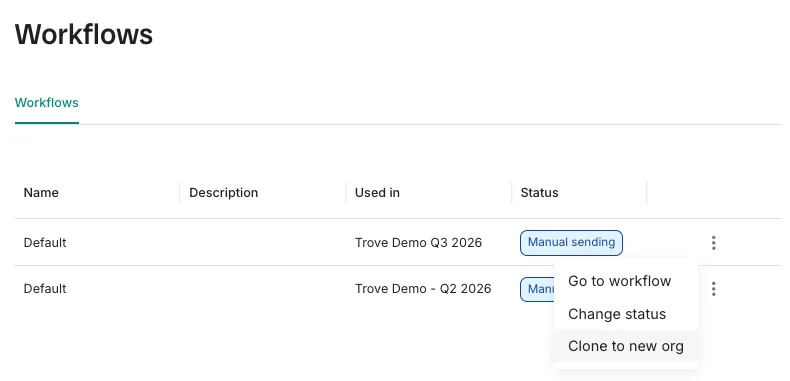
Although the workflows and templates are cloned, each workflow still uses the relevant Xero entity’s contacts. That means reminders always go to the correct email address.
Credit control for multi-entity groups in summary
Xero is built for single-entity organisations which can make credit control a hassle for multi-entity groups. A layer like Trove lets you build the process once and run it consistently across every entity, while keeping each brand’s chasing separate and correctly addressed.
If you’re weighing this up for your own group, we’ve covered the related questions separately: whether bringing credit control in-house makes sense for a portfolio, how to onboard a group of companies onto Trove entity by entity, and the reports that matter once you’re running one across a group.
Trove runs a free 30-day trial and takes about 15 minutes to connect each Xero organisation.
FAQ
Can Xero manage credit control across multiple companies?
Not in a shared way. Xero keeps each company as a separate organisation, so reminders, templates and workflows are set per company. There’s no group-level credit control or combined overdue view built in.
Can I use one chasing process across all my Xero organisations?
Only with a layer on top. In Trove you build a workflow once and clone it to each organisation, so every company runs the same process while still being customisable per entity.
Will customers see chasers from the wrong company?
Not if each entity is set up separately. In Trove every company sends from its own email and branding, so even shared clients are always chased by the right brand.
Do I need a separate login for each company?
No. Trove sits all your entities under one umbrella login, so you switch between them in one place rather than logging in and out of each Xero file.