Summary
- What is a payment plan. A payment plan is an arrangement you agree directly with a customer, a fixed amount each week or month, to clear an overdue balance over time.
- The tracking problem. Xero has no payment plan feature, so most people police these manually which can quickly pile up the admin.
- Still one invoice. The original invoice stays intact in Xero. The plan should sit on top of it.
- When one is missed. Only the missed instalment is chased. The rest of the plan carries on, and you decide whether to renegotiate or escalate the balance.
Why payment plans are hard to keep on track in Xero alone
Generally, a payment plan is straightforward to agree - you come to an arrangement with the customer on a call or email and they (usually) start to pay it. The work comes with tracking what’s going on.
Here are the key issues to watch out for in Xero:
- Xero does not have a payment plan feature so you will have to track the agreed payment schedule in your head or in a spreadsheet.
- If something is missed, you will need to alert the customer yourself. Xero won’t know.
- If you are using Xero’s built-in reminders, you will have to turn them off for this invoice - because Xero only knows about the original overdue invoice, its reminders will still reference the full balance. That means a customer diligently paying £800 a week can still get an email chasing the whole £10,000.
It’s important to stay on top of your payment plan because otherwise you’re back to square one with an unpaid invoice and no payments coming in against it.
How to set up a payment plan in Trove
In Trove you can apply a payment plan to the customer’s whole outstanding balance or to a single invoice. Here’s now it works:
- Choose the invoices you want to include in the plan
- Set the number of instalments and the frequency
- Edit any individual amounts and dates so the plan matches exactly what you agreed
- Mark any instalment that’s already been paid as paid.
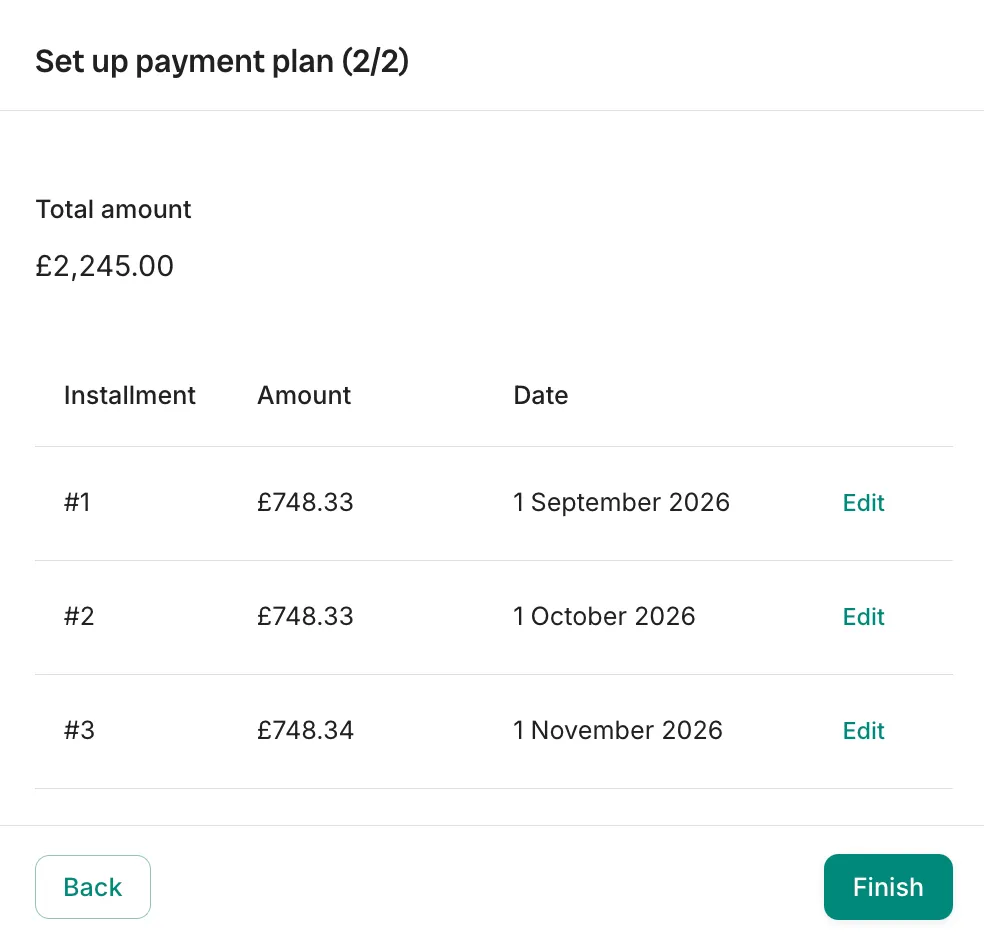
The step-by-step, with the exact screens, is in how payment plans work in Trove. The point worth making here is that once it’s set up, the arrangement stops living in a spreadsheet and starts running itself.
How Trove manages collecting the agreed payment plan
Trove takes over tracking the payment of each plan instalment. If an instalment is missed, Trove will nudge the customer about that instalment specifically (not the entire overdue balance).
Meanwhile, the original invoice stays put in Xero so your accounting stays clean. The plan simply governs what gets chased and when.
If a client misses their instalment and doesn’t reply to chasers, you can decide what happens next. If the customer’s simply slipped a week, a few nudges on that one instalment usually do the job.
If they've gone quiet or the plan's clearly not being respected, you can decide between renegotiating the arrangement or escalating the balance. [When to offer a payment plan (and when not to)](https://trove.works/when-to-offer-a-payment-plan/) covers how to judge that, and if you're moving toward charging for the delay, [the complete guide to UK late payment fees](https://trove.works/late-payment-fees-uk/) sets out what you're entitled to add.Getting started
An informal arrangement you’ve agreed directly with a customer doesn’t have to mean a spreadsheet and manual tracking. Set it up in Trove once, let it chase only what’s due, and step in only when something’s actually missed. For the wider picture, start with the complete guide to payment plans for overdue customers.
Trove runs a free 30-day trial and takes about 15 minutes to connect to your Xero account. You can start a free trial here or book a demo if you’d like to see it on your own data first.