

Summary
- The problem: Xero reminders go to the primary contact plus everyone with “Include in emails” ticked, not just the person the invoice actually went to.
- Xero has confirmed it can’t be changed: reminders follow the contact record, not the invoice’s “To” field, and there’s no setting to make them do otherwise.
- Four workarounds inside Xero: audit contact records, leave only one address ticked, turn reminders off for a customer or invoice, or change the default recipient before sending - each trades away either accuracy or automation.
- How Trove fixes it: assign an invoice to a specific contact at account, customer, or invoice level, so only that person is chased.
Why does Xero send invoice reminders to all my contacts?
Because Xero sends reminders based on the customer record, not the invoice. When a reminder runs, Xero looks at the customer’s contacts and emails anyone with “Include in emails” ticked. It doesn’t check who you sent the original invoice to. The invoice and the reminder are, in effect, two separate things pointed at the same contact.
Here’s how that plays out.
Your company provides a cleaning service to 10 restaurants in the same group (Smith’s). In Xero, you set up Smith’s as one contact with 11 emails, one per restaurant and one for HQ. Each month you invoice each restaurant separately, choosing the right recipient from the “To” field and hitting send.
One restaurant, Smith’s Brasserie, starts paying late, so you turn on Xero reminders to chase them after 10 days.
On day 10 you get an angry email from the Brasserie. They’ve been chased about their late payment, but so have all 10 other Smith’s addresses in Xero.
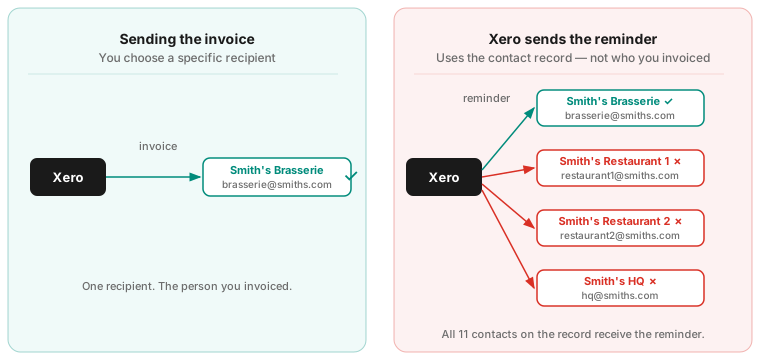
The Brasserie is embarrassed in front of the group. The other restaurants are annoyed by an email that has nothing to do with them. And you didn’t do anything wrong. Xero just sent the reminder to everyone.
Who exactly does a Xero invoice reminder go to?
A Xero reminder goes to the primary contact on the customer, plus every additional person who has “Include in emails” ticked. Two things decide the list, and both of them live on the contact record:
- The primary contact. Always included, every time.
- Anyone with “Include in emails” ticked. Every additional person on the customer record with that box checked gets the reminder too.
Xero builds this list at the moment the reminder runs. The address you typed into the “To” field when you sent the invoice isn’t stored against that invoice for reminder purposes, so if you manually entered a different email address at send time, the reminder ignores it.
This is most annoying when one Xero customer covers several real recipients. A few examples we see at Trove:
- A training company that invoices a client’s employees individually, and wants each employee chased individually.
- A mechanic working for a manufacturer with multiple plants, kept as one customer for accounting but needing separate invoices and reminders per plant.
- A benefits company invoicing different departments (HR, Finance, Sales) within one client, separately, and not wanting each department to see the others’ chasers.
In every case the structure is the same: one Xero customer, several people who should each only be chased about their own invoices.
Can Xero send a reminder only to the person you invoiced?
Not automatically, and this isn’t a setting you’ve missed. Xero has confirmed it directly. Responding to a customer asking for exactly this on its product ideas board, Xero said reminders go to the contact record and that changing which recipient a reminder goes to currently isn’t possible.
It’s one of the most-requested fixes Xero has on the board, from both directions. Businesses are asking to send reminders to the original invoice recipient, and separately asking for the opposite, to send reminders to a different address than the invoice. Both are worth a vote. Neither is built.
So until Xero changes it, your options are a workaround inside Xero or a tool that handles recipients properly.
How do I stop Xero sending reminders to all contacts?
There are four things you can do inside Xero. Three of them work by trimming or switching reminders off. Only the fourth actually points a reminder at a chosen person, and it needs doing on every invoice.
1. Audit your contact records. Go to Contacts > Customers and review which email addresses are listed for each customer. Uncheck “Include in emails” for anyone who shouldn’t get payment reminders. This won’t link reminders to the right person, but it stops you spamming every contact.
2. Leave only one address ticked. A stricter version of the above. If every invoice for a customer always goes to the same person, and that’s the person you need to chase, leave that one address ticked and nothing else. It falls apart the moment a second person at that customer needs invoicing.
3. Turn off reminders for specific customers or invoices. For sensitive or high-value clients you’d rather chase manually, turn Xero invoice reminders off for one customer on their contact record. For one-offs, open the invoice in the Awaiting Payment tab and choose “Turn off invoice reminders” from the More menu. Both prevent the wrong-person problem by removing the reminder entirely, which means chasing those invoices yourself.
4. Change the default recipient before you send. Reminders follow the contact record’s default recipient, not the address you type into the “To” field at send time. So if you change the default recipient on the contact when you approve and send the invoice, later reminders will follow it. This is the only one of the four that actually routes a reminder to a person you’ve chosen, but it means editing the contact record on every invoice, and the change sticks until you change it back, so the next invoice for that customer inherits it. For a one-off chase, it’s simpler to send a Xero reminder manually and change the recipient as you send.
None of these make a reminder follow the invoice automatically. They reduce the blast radius, or they shift the work onto you.
How does Trove send reminders to the right contact only?
Trove connects to your Xero account and lets you assign an invoice to a specific contact, either manually or automatically based on filter criteria. From then on, every reminder about that invoice goes to that contact only, and no one else on the Xero customer gets chased.
You can set that up at three levels:
- Account-wide. If you always want reminders to go to the person the invoice was sent to, set it once as an account rule and it applies everywhere.
- Per customer. Set a default rule on a customer and Trove applies it to every invoice for them automatically.
- Per invoice. For one-offs where a specific invoice needs a different recipient, assign that invoice on its own.
Setting it up takes three steps:
- In Trove, turn on sub-customers in your settings.
- Choose how you want the right contact assigned for each invoice, at account, customer, or invoice level.
- Reminders for that invoice now go only to that contact. Everyone else on the Xero customer is left alone.
That handles the case Xero can’t: one customer, several recipients, each chased only about their own invoice.
“This app has saved us a huge amount of valuable time. We had always struggled with Xero’s automated email function, as we invoice multiple clients within the same organisation. This app has allowed us to assign email addresses to individual invoices, which has made the process far more efficient. I would highly recommend it to any organisation facing the same issue.”
Daisy Docherty, Head of Finance, GTR. Read full review
What if the person who pays works at a different company?
Sometimes the problem runs the other way. Each invoice has to go to a separate entity, but one person pays for all of them: a holding company paying for its subsidiaries or one owner paying for several franchise sites. Xero sees those as unrelated customers and chases each one separately, so that one person gets a stack of reminders.
In Trove, a parent customer groups them. The person who pays gets one chase and one statement for the whole group.
What if the right person still isn’t reading the email?
Sometimes the reminder reaches the right inbox and still goes unread, either sitting in a shared mailbox no one reads or buried in a hundred other emails. That’s where a text can help. Trove can send SMS reminders as well as email, so you can reach the right person directly. See how SMS invoice reminders work.
The bottom line
Xero’s invoice reminder system is a good starting point. It’s free on most plans and quick to set up. But it has a structural problem for anyone with a slightly more complex client setup, and Xero has said plainly it can’t currently be changed. The fixes inside Xero reduce the problem without solving it. For businesses where this keeps happening, a dedicated tool is usually cleaner.
Trove runs a free 30-day trial and takes about 15 minutes to connect to your Xero account. Start a free trial or book a demo to see how reminders route to the right contact.
- Can you send reminders to a different email than the invoice? - for AP inboxes and the invoicing-vs-queries split.
- Sub-customers: chasing different departments in one company - one customer, several recipients.
- Parent customers: chasing a group of companies as one account - several customers, one person who pays.
- Xero SMS invoice reminders - reaching the person when email isn’t read.
- How to change who reminder replies go to - the reply-to setting.
- Xero invoice reminder limitations - the six limits in one place.