Summary
- The problem: you can invoice different contacts at the same Xero customer, but reminders go to everyone on that customer’s contact list, not just the person invoiced.
- Why the Xero fixes fall short: splitting the company into separate customers fixes the chasing but fragments statements and aged receivables; managing “Include in emails” manually means editing the record before every send.
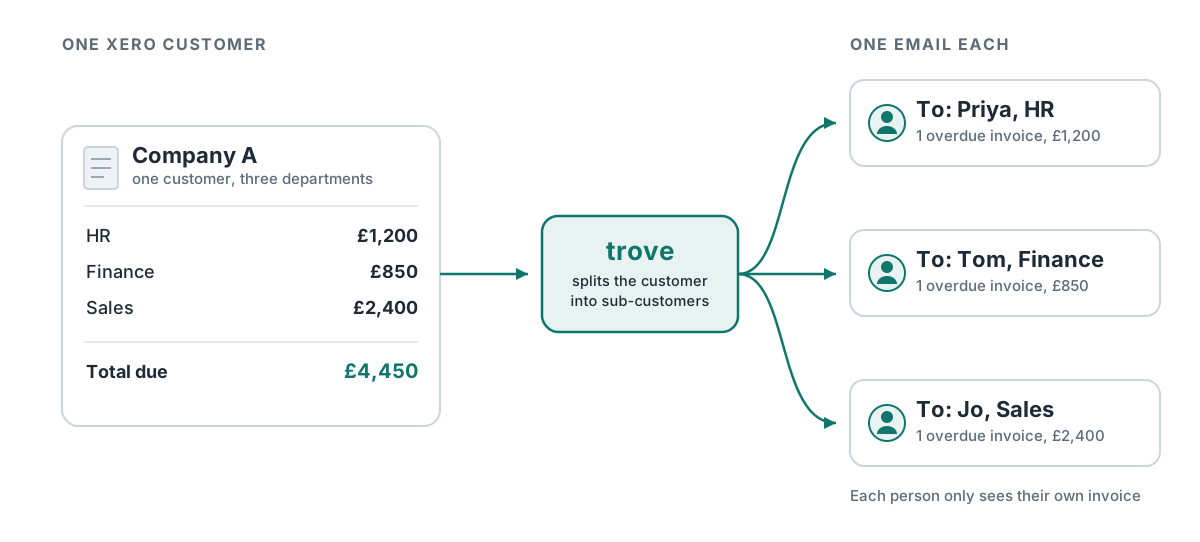
- How Trove fixes it: sub-customers split one Xero customer into several. Each department, site or project is chased about its own invoices, while the customer stays a single record in Xero.
- Set up by rule: Trove identifies sub-customers from the invoice, customer, address or line item. It creates them automatically or suggests them for you to confirm, and each one gets its own contact and workflow.
Can you invoice different contacts at the same customer in Xero?
Yes. You can add multiple contacts to a single Xero customer - one per department, site or project - and pick the right recipient from the “To” field each time you send an invoice. Invoicing different people within one company works fine.
Chasing them separately is where it breaks. Xero’s invoice reminders don’t follow the recipient you chose on the invoice. When a reminder is sent, it goes to the primary contact plus everyone with “Include in emails” ticked on that customer. So the invoice can go to one department while the subsequent reminder goes to all of them.
Why does Xero chase every contact instead of just one?
It’s how Xero is set up. The invoice remembers who you sent it to but the reminder doesn’t. When the reminder is sent, Xero goes to the customer’s contact list and emails everyone on it.
This is a common complaint. Businesses keep one customer record per client for clean accounting, then invoice several people inside that client separately. A few real examples we see at Trove:
- A benefits company invoicing HR, Finance and Sales separately within one client, and not wanting each department to see the others’ overdue chasers.
- A firm raising invoices per case or project to different contacts inside a client - for instance a law firm where each matter has its own contact, and a reminder should only go to the person handling that matter.
- A supplier to a large customer with multiple sites or regions, kept as one customer for accounting, where the right recipient varies by site and no one wants chasers for invoices that aren’t theirs.
In every case the structure is identical: one Xero customer, several real recipients, each of whom should only receive reminders about their own invoices.
What are the workarounds in Xero?
There are two ways to handle this in Xero, and both create new problems.
Split the company into separate Xero customers. You could set up HR, Finance and Sales as three separate customers. Reminders would then go to the right place, but you lose the single customer view your accounting relies on - statements, aged receivables, credit limits and the overall balance for that client are now fragmented across several records. For many finance teams that’s a worse problem than the one you started with.
Manage “Include in emails” manually. You could keep one customer and untick everyone except the person a given invoice went to. But the recipient changes from invoice to invoice, so you’d be editing the contact record before every send and risking the wrong department being chased every time you forget.
Neither gives you what you actually want: one customer record, with each invoice chased only to the department that received it.
How sub-customers work in Trove
A sub-customer is one slice of a Xero customer: a department, a site, a project or a person. Trove assigns each invoice to the right sub-customer and chases only that sub-customer’s email contact. Nothing changes in Xero. The customer stays one record, with one balance and one line on your aged receivables report.
Setting up sub-customers
You tell Trove how to recognise each sub-customer, using a field on one of four things:
- The invoice, such as who it was sent to, to split a client by department.
- The address, to split a client with several sites or branches.
- The line items, to split by project or product line.
- The customer, to set a rule that applies to everything for that client.
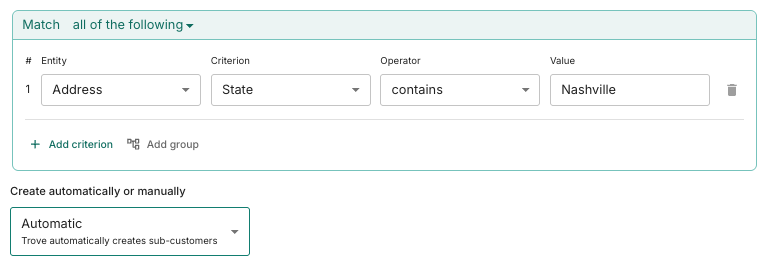
Then choose how sub-customers get created. On automatic, Trove creates them for you. On manual, Trove suggests sub-customers and you confirm them. For a one-off, you can still assign a single invoice to a contact manually.
Here’s an example of using state to assign certain invoices to one branch or site.
What each sub-customer gets in Trove
- Its own contact. Reminders only reach the person responsible for those invoices, so HR never sees Finance’s chasers.
- Its own workflow. A department that always pays late can get a firmer sequence than the rest of the client.
- Statements your way. By default, statements stay at the Xero customer level: one statement for the whole client. Turn on statements to sub-customers and each one gets a statement showing only its own invoices.
For a worked example, see how one cleaning company chases each restaurant in a group separately.
Review of sub-customer functionality in Trove
“This app has saved us a huge amount of valuable time. We had always struggled with Xero’s automated email function, as we invoice multiple clients within the same organisation. This app has allowed us to assign email addresses to individual invoices, which has made the process far more efficient. I would highly recommend it to any organisation facing the same issue. Trove is easy to use and very forward thinking, actively taking on customer feedback and implementing changes to meet customer needs.”
Daisy Docherty, Head of Finance, GTR. Read full review
The other direction: parent customers
Sometimes the problem runs the other way. A customer’s group is set up as several separate companies in Xero, but one person pays for all of them. For that, Trove has parent customers, which group the companies into one account with one chase and one statement. See how parent customers work.
FAQ
Does Xero have sub-customers?
No. QuickBooks does, but Xero doesn’t. In Xero, you either add several contacts to one customer, and they all get every reminder, or split the client into separate customers and lose the single view of what they owe.
Can each sub-customer get different reminders?
Yes. Each sub-customer in Trove can follow its own chasing workflow, with its own timing and wording.
Do sub-customers get their own statements?
Only if you want them to. By default, Trove sends one statement per Xero customer. Turn on statements to sub-customers and each department, site or project gets a statement for just its own invoices.
Try it on your own Xero account
Sub-customers are part of Trove’s Integrated package (£135/month), and Integrated comes with a free 30-day trial. Trove takes about 15 minutes to connect to your Xero account. Book a demo to see sub-customers set up on your own customers.
For the wider picture, including how to control exactly who gets chased, see why Xero sends reminders to the wrong contact. And if departments need invoices at one address and reminders at another, see sending reminders to a different email than the invoice.