Support › Workflows
Send automatic statements to customers
Add a statement step in any workflow so Trove sends enrolled customers a monthly statement, on your chosen day, from your own address.
- Add a statement as one of the message types in any workflow
- Send on a set day (or days) each month with your chosen wording
- Statements go to everyone enrolled in that workflow
- Send to any customers with outstanding balances, or only those overdue
- Add cc or bcc recipients alongside the customer
Available on all plans
How to add a statement step to a workflow
You’ll set this up inside an existing or new workflow. See Workflows for how enrolment and the rest of a workflow’s steps work.
Add a statement step
In a workflow, add a new step under calendar reminders. It sits alongside any invoice reminder or thank-you steps in the same workflow.
Set when it sends
Under Calendar reminders, set the days into the month you want it to send. Add more than one if you want statements going out twice a month. Trove sends to everyone enrolled in the workflow on those dates, every month.
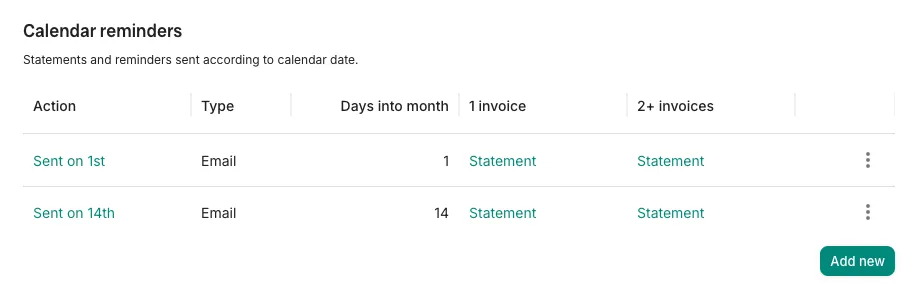
Setting the days into the month a statement step sends. Write the email, pick your address, decide what triggers it
Write the subject and message your customers will see, and choose which of your connected addresses it sends from. Add any cc or bcc recipients you want copied in. Turn on Attach statement and pick the statement type, then use Only send when overdue to decide whether it goes to everyone enrolled or just those overdue.
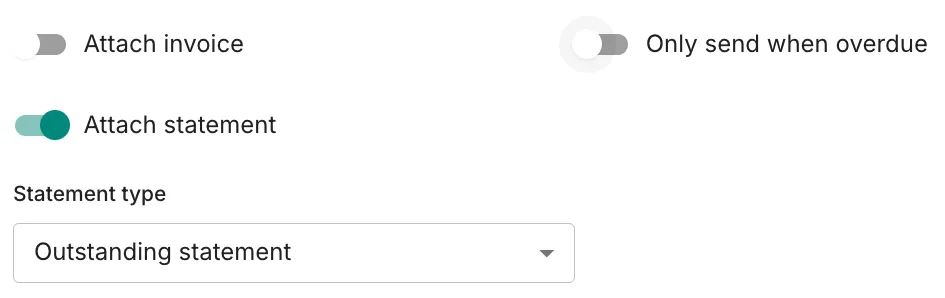
Choosing what’s attached and who receives the statement. Turn the workflow on
Review the workflow and switch it on. Each customer enrolled gets a statement covering their own outstanding invoices, sent automatically on your chosen date.
Want a different message or schedule for a different group of customers? Build a separate workflow for each, with its own enrolment criteria, dates and wording.
What plans include it
Available on all plans
This feature is part of Trove's core set and is included on all plans.