AI Reply Agent
Process replies and take actions faster with Trove's AI.
- Trove processes replies and extracts promised payment dates
- Drafts responses for you to approve or auto-approve
- All payment dates and contacts are kept up to date in your accounting software
“We'll pay INV-20089 on Friday 28th.”
- Expected payment date set to 28 Nov in Xero
- Reminders paused until 29 Nov
- Thank-you reply drafted
- Follow up on 29 Nov if still unpaid
Trusted by finance teams around the world





“Trove lists the actions and when I click one, it generates an AI email I can send, which saves so much time. Trove has already brought us many more responses than our previous automated chasing system.”
Millie Keigher
Accountant

How Trove's AI Reply Agent works
-
1
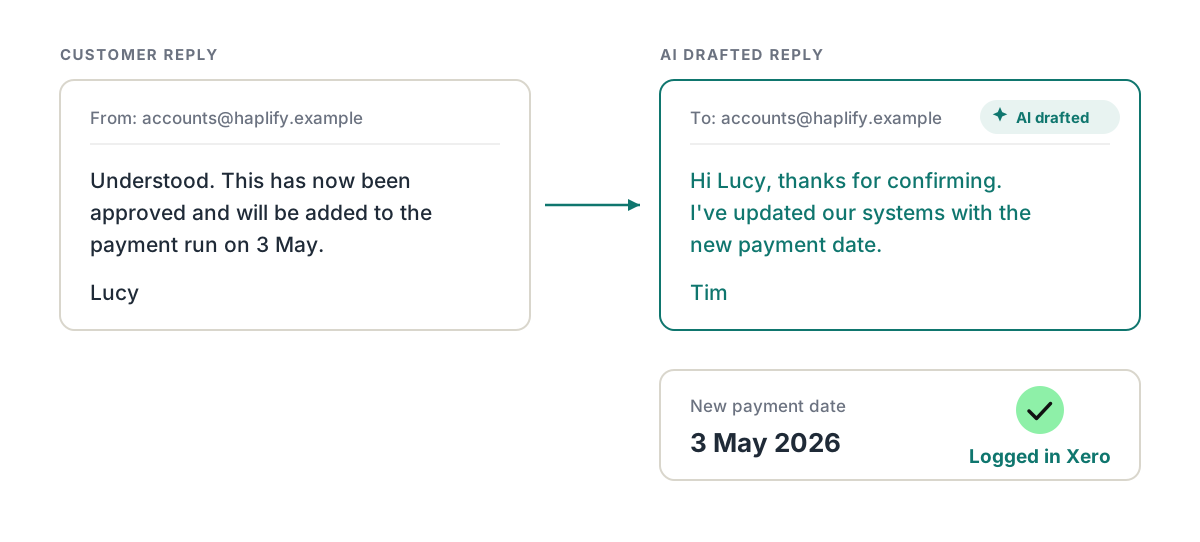
"We'll pay on the 3rd" becomes a logged date and a drafted reply
Trove processes customer replies, picks out the promised date and suggests setting it as the expected payment date in your accounting software. It drafts your reply at the same time, so the customer hears back the same day.
-
2
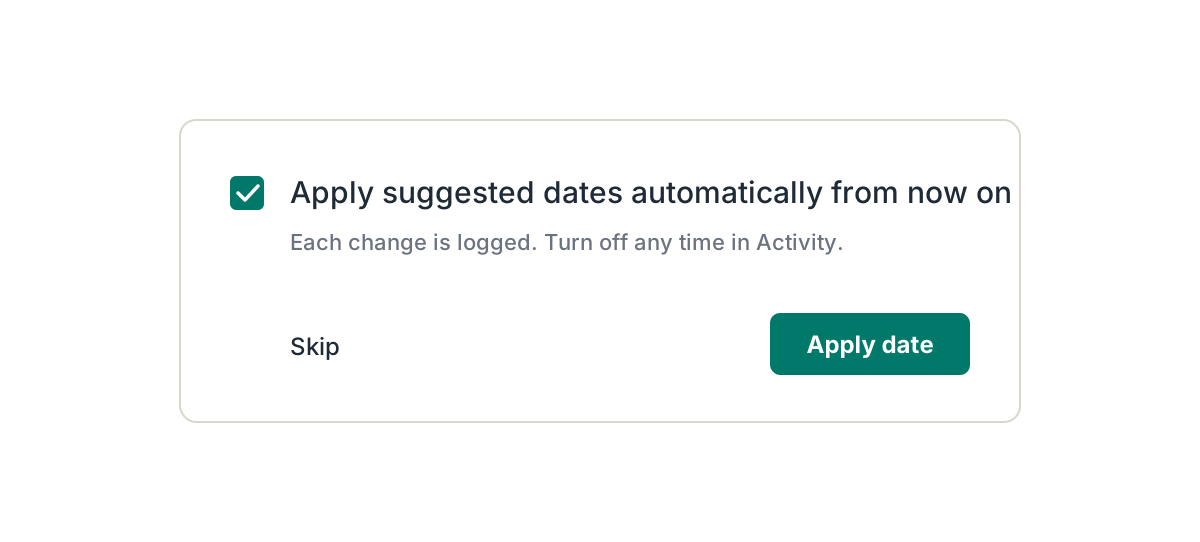
Review each action or set to auto-approve
Once you've approved the same kind of action a few times, switch it to auto-approve and Trove applies it for you. Everything it does is logged against the customer.
-
3
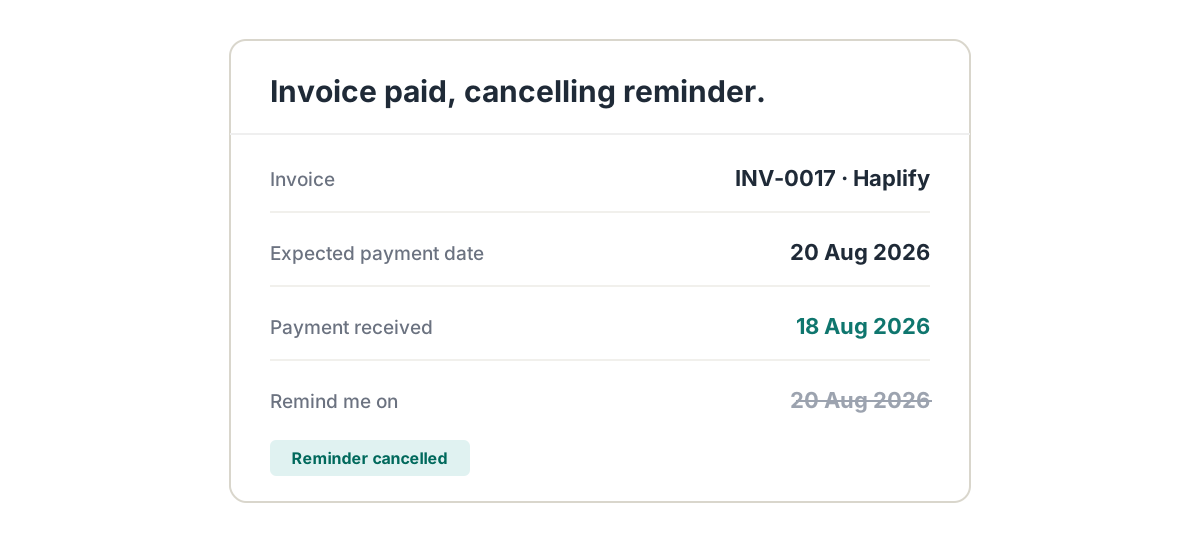
Follow-ups get voided when the money lands
Once a payment date is logged, Trove pauses chasing and schedules a follow-up in case the payment doesn't land. If the invoice is paid first, the follow-up is cancelled.
-
4
All from your inbox
Connect Gmail or Outlook to Trove in a couple of clicks, including shared inboxes like accounts@.
Rather not connect a mailbox? Authorise Trove to send from your domain by adding a DNS record, and replies still come back to your inbox.
-
 Gmail
Gmail -
 Outlook
 - Your domain, via DNS
-
Resources on Trove's AI Reply Agent
- Payment dates
Update Xero's expected payment date directly from your email
When a customer replies with a payment date, Trove reads it and updates the expected payment date in Xero for you, then pauses chasing until the date passes.
Read now - Payment dates
Using Xero's expected payment date feature in your credit control process
What Xero's expected payment date is, how to update it on one invoice or many at once, and how to stop doing it by hand.
Read now - Cash flow
Use Xero's expected payment date to forecast when you'll receive payment
Your forecast is built on due dates, but customers don't pay on due dates. How expected payment dates give a live picture of when money will arrive.
Read now - Xero credit control
How to change who Xero invoice reminder replies go to
Replies can keep landing with someone who's left or no longer chases invoices. How to change the reply-to address, and the one-per-org limit you're left with.
Read now
AI Reply Agent: common questions
Everything you need to know
Does Trove's AI send emails without me seeing them?
Not unless you choose to. By default, every drafted reply and action waits on your task list for you to approve or edit. You can switch individual types of action to auto-approve once you're happy with them.
Which emails does the AI Reply Agent read?
Replies to the chasers Trove sends. It works with Outlook and Gmail, including shared inboxes such as accounts@ or finance@.
Can it read remittance advice?
Yes. Trove reads remittance details in the body of an email or in an attached PDF, and picks out which invoices are being paid and when.
What happens when a customer says they've paid but the money hasn't arrived?
Trove drafts a reply saying you'll look out for the payment. Once the payment shows up in your accounting system, the draft updates to confirm you've received it.
Does it update my accounting software?
Yes. Expected payment dates and new contacts that you approve sync back to your accounting software, such as Xero, QuickBooks or FreeAgent, so your team and your cash forecast see the same information.
Which Trove plans include the AI Reply Agent?
The AI Reply Agent is included on every Trove plan, from Essential up. Every plan is a fixed monthly price with unlimited team members.
Related features
-
Personalised emails
Tailored reminder emails and statements, written with AI and worded differently every time.
-
Send from a custom domain
Every reminder comes from your Gmail, Outlook or own domain, and replies come straight back to you.
-
Kanban board
A shared board of overdue accounts, synced with your accounting system, with an owner on every card.
See it working on your own customers
See AI Reply Agent in action.
Last updated