Parents and sub-customers
Split a customer into entities or group them under one parent before chasing.
- Parent customers group multiple entities under one contact.
- Sub-customers split one customer into different entities, each with its own email contact.
- Parents and sub-customers in Trove don't change your ledger.
Trusted by finance teams around the world







“We had always struggled with Xero's automated email function, as we invoice multiple clients within the same organisation. This app has allowed us to assign email addresses to individual invoices, which has made the process far more efficient.”
Daisy Docherty
Head of Finance

How parents and sub-customers work in Trove
-
1
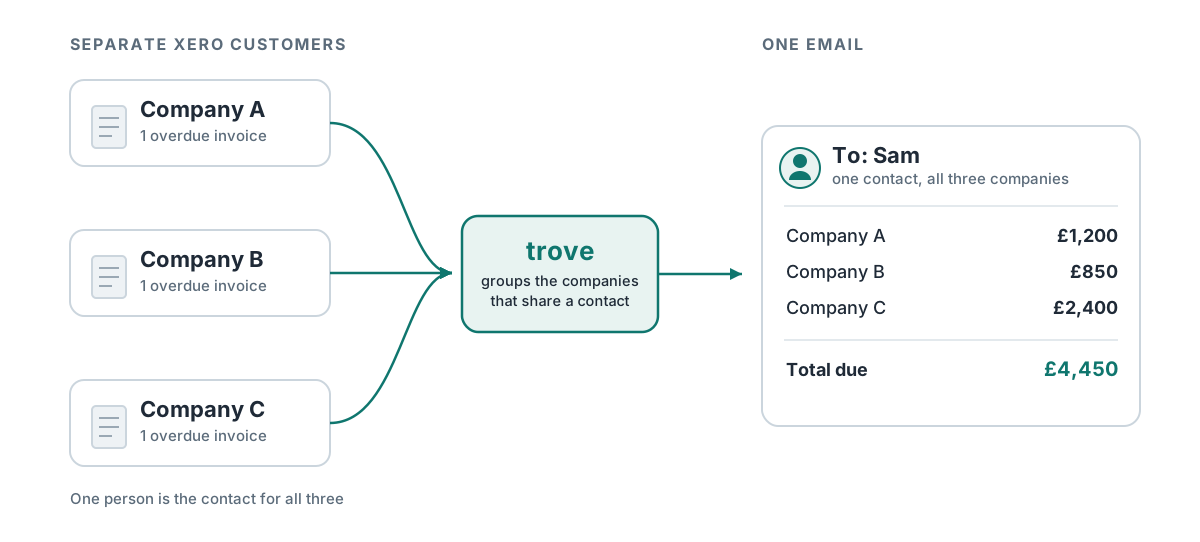
One contact to chase for the group
One AP team at the holding company often manages payments for several subsidiaries, each its own customer in your ledger.
Group them under a parent customer in Trove and chase all invoices across the holding company in one.
-
2
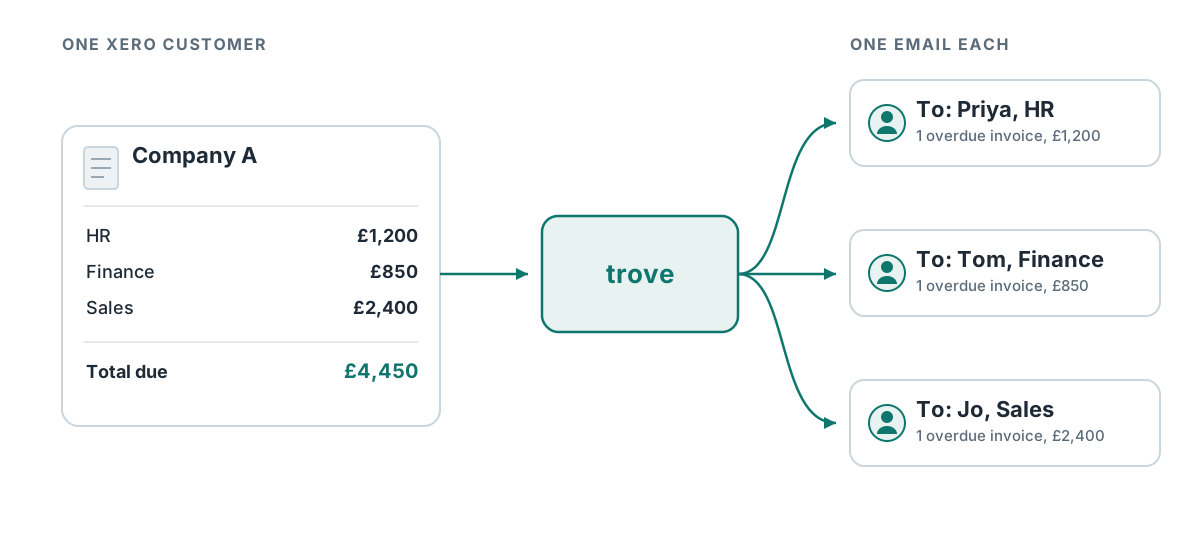
Each contact chased about their own invoices
One customer can have an HR team, a finance team or three sites, each receiving its own invoices but under one contact in your ledger.
Split the customer into sub-customers in Trove and each one gets its own contact, its own workflow and, if you want, its own statement.
-
3
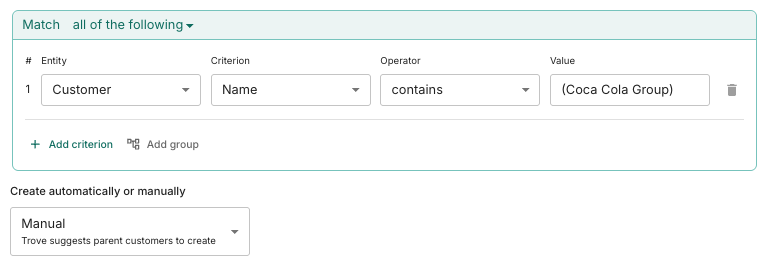
Set up once, kept up to date by rules
Tell Trove how to spot related companies or departments, such as a shared name, a contact group, an address or who the invoice went to. New subsidiaries, sites and departments get picked up automatically as your customers grow.
-
4
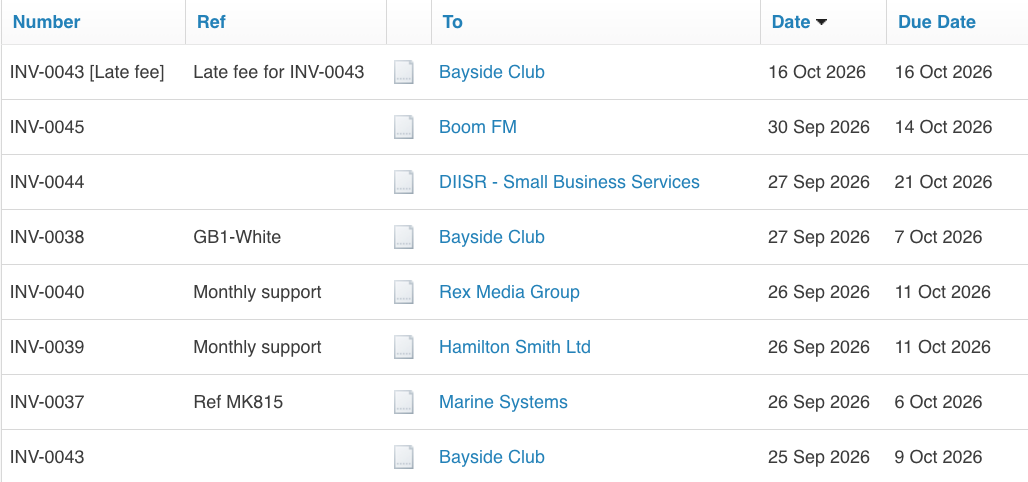
Nothing changes in your ledger
Every invoice stays against the entity and customer record so your ledger stays accurate. Trove only changes how your customers are chased for overdue invoices.
Parents and sub-customers in Xero vs Trove
Xero has no parent or sub-customer structure. Here's what that means when you chase a group or a customer with several departments.
| Xero on its own | Trove | |
|---|---|---|
| Chase a group of companies as one account | No. Contact groups show the companies together, but you can't send a reminder or statement to a group. | Yes. A parent customer gets one email listing every overdue invoice across the group. |
| One statement for a group | No. Statements go one customer at a time. | Yes, sent to the contact you choose for the group. |
| Chase each department of one customer separately | No. Reminders go to every contact with "Include in emails" ticked, whoever the invoice went to. | Yes. Each sub-customer is chased about only its own invoices. |
| Different reminders per department or site | No. Xero runs one organisation-wide reminder schedule. | Yes. Each sub-customer can follow its own workflow. |
| Changes to your Xero records | Splitting or merging customers in Xero fragments statements and aged receivables. | None. Invoices stay against the same customers in Xero. |
Resources on parents and sub-customers
- Parents & sub-customers
Parent customers: chasing a group of companies as one account
Xero treats every company as unrelated. In Trove, you can use group customers under one parent and send reminders or statements to that parent only.
Read now - Parents & sub-customers
Sub-customers: chasing different departments in one company
You often have multiple contacts in a company that need separate invoicing and chasing. Here's how to solve it with sub-customers in Trove.
Read now - Xero credit control
Why Xero sends invoice reminders to the wrong contact and how to fix it
Xero reminders go to everyone on the customer record, not the person you invoiced. Why that happens, what you can change in Xero, and the cleaner fix.
Read now - Xero credit control
Can you send Xero invoice reminders to a different email than the invoice?
Invoice reminders hitting a customer's AP inbox create confusion. Here's why it happens and how to route invoice chasers to a separate email address.
Read now
Parents and sub-customers: common questions
Everything you need to know
What's the difference between a parent customer and a sub-customer?
A parent customer groups several of your customers into one account, for example a holding company and its subsidiaries. A sub-customer does the opposite: it splits one customer into several, such as departments, sites or projects, each chased separately.
Does grouping or splitting customers change anything in Xero or my accounting system?
No. Invoices stay against the same customer records. Trove changes how they're chased, which statements are sent and how balances show up in Trove's reports.
Can each sub-customer get different reminders?
Yes. Each sub-customer can follow its own chasing workflow, with its own timing, wording and contact.
Can a group of companies get one statement?
Yes. A parent customer gets a single statement covering every company in the group, sent to the contact you choose.
How is this different from multi-entity support?
Parents and sub-customers are about how your customers are structured. Multi-entity support is for when your own business runs several companies, each with its own ledger, and you want to chase across all of them from one login.
Which Trove plans include parents and sub-customers?
Parents and sub-customers are included on the Integrated and Advanced plans. Both are a fixed monthly price with unlimited team members, and you can try them free for 30 days.
Related features
-
Multi-entity support
Every company in your group under one login, with each brand chasing on its own.
-
Personalised emails
Tailored reminder emails and statements, written with AI and worded differently every time.
-
Credit control reporting
Live reports on overdue invoices and debtor health, with your own reports and group reporting on bigger plans.
See it working on your own customers
See parents and sub-customers in action.
Last updated