Connect HubSpot to your credit control
Your sales team can see overdue invoices without a Xero seat.
- Every Trove chaser or statement logged in HubSpot
- Workflows routed by CRM data
- Chaser emails sent directly from the account manager


Trusted by finance teams around the world







How the HubSpot integration works in Trove
-
1
Visibility on overdue invoices for the Sales team
Your account managers live in HubSpot, and your invoices live in your accounting system.
Trove copies every chaser to the customer's HubSpot record, so sales can see what's overdue without a Xero seat. They can also log in to Trove, which has unlimited team members on every plan.
Activity HubSpot
-
Logged by Trove
Final reminder: INV-2041 is 21 days overdue
Sent from Sarah Collins
INV-2041 · Due 30 Sep £4,820.00
-
-
2
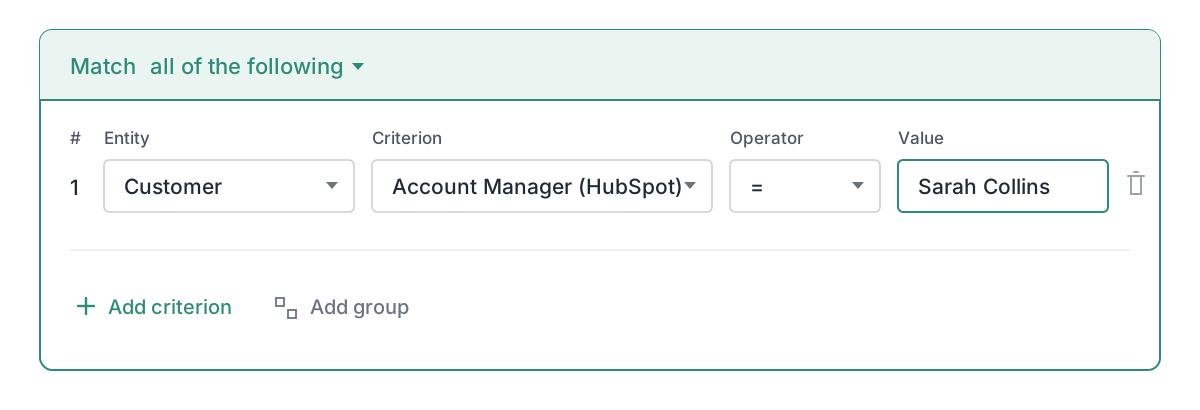
Route chasing by your CRM data
Use any HubSpot properties in Trove to decide which workflow a customer goes into.
Popular options include account manager, deal size or geography.
-
3
Send chasers from the account manager
Trove can send later reminders from the account manager instead of finance.
Customers hear from someone they know and finance doesn't have to chase the account manager first.
Chasing sequence
-
Email · 3 days overdue
Friendly reminder
From accounts@
-
Email · 10 days overdue
Second reminder
From accounts@
-
Email · 21 days overdue
Third reminder
From Sarah Collins (Account Manager)
-
-
4
Not on HubSpot? Connect your own CRM
Advanced plan
If your customer data lives in Salesforce, Pipedrive or a CRM you've built yourself, the Advanced plan connects Trove to it.
It's the same setup as Hubspot, just with your data and CRM.
Two-way syncYour CRM
Resources on CRM access
- Workflows
Setting up different invoice reminders for different Xero customers
Xero's built-in reminders use the same template for every customer. Here's how to run different reminder workflows per customer type.
Read now - Integrations
Microsoft Dynamics 365 Business Central: credit control software compared (2026)
Compare credit control software for Microsoft Dynamics 365 Business Central. Pricing and features for Chaser, Trove and Kolleno side by side.
Read now - Integrations
Best credit control software for Xero + Gmail + Slack (2026)
Chasing unpaid invoices from Gmail with Slack notifications? Here's which credit control tools connect Xero, Gmail and Slack, and how they compare.
Read now
CRM access: common questions
Everything you need to know
Does Trove integrate with HubSpot?
Yes. Trove connects to HubSpot on the Integrated plan. It reads company and contact properties to route your chasing, and copies every chaser to the customer's HubSpot record.
Can my sales team see overdue invoices without a Xero licence?
Yes. Chasers are logged on the HubSpot record, so account managers can see what's overdue in the CRM they already use. Trove also has unlimited team members on every plan, so anyone who needs more can log in to Trove without a Xero seat.
How does Trove match HubSpot companies to my customers?
Trove matches them automatically by email domain, so a HubSpot company and the customer in your accounting system are linked without any manual mapping.
Which HubSpot data can I use in my workflows?
You can use HubSpot company and contact properties, including the company owner, deals and your own custom properties, to decide which workflow a customer goes into.
Can the account manager be included in the chase?
Yes. You can copy the HubSpot owner in on chasers, send later reminders from them, or hand the account over to them at a set point in the sequence.
Does Trove work with CRMs other than HubSpot?
HubSpot is included on the Integrated plan. Custom CRM connections are available on the Advanced plan.
Related features
-
Parents and sub-customers
Group related companies under one parent, or split one customer into departments and sites.
-
ERP integrations
Two-way sync with Xero, QuickBooks, FreeAgent, Stripe, Business Central, Sage and NetSuite.
-
Kanban board
A shared board of overdue accounts, synced with your accounting system, with an owner on every card.
See it working on your own customers
See CRM access in action.
Last updated