ERP integrations
Sync invoices and payments from the accounting system or ERP you already use.
- Two-way sync that reads from and writes to your ERP.
- Data is refreshed via webhooks so it is always accurate.
- Xero, QuickBooks, FreeAgent and Stripe are on every Trove plan. Business Central, Sage, and NetSuite are on Advanced.
Essential and Integrated
-
 Xero
Xero -
 QuickBooks
 -
 FreeAgent
 -
 Stripe
Advanced
-
 Microsoft Dynamics 365 Business Central
 -
 Sage Intacct
 - Sage Accounting
-
 NetSuite
Ultimate
Custom integrations with the systems you already use.
Trusted by finance teams around the world




How Trove's ERP integrations work
-
1
A two-way sync with your ledger
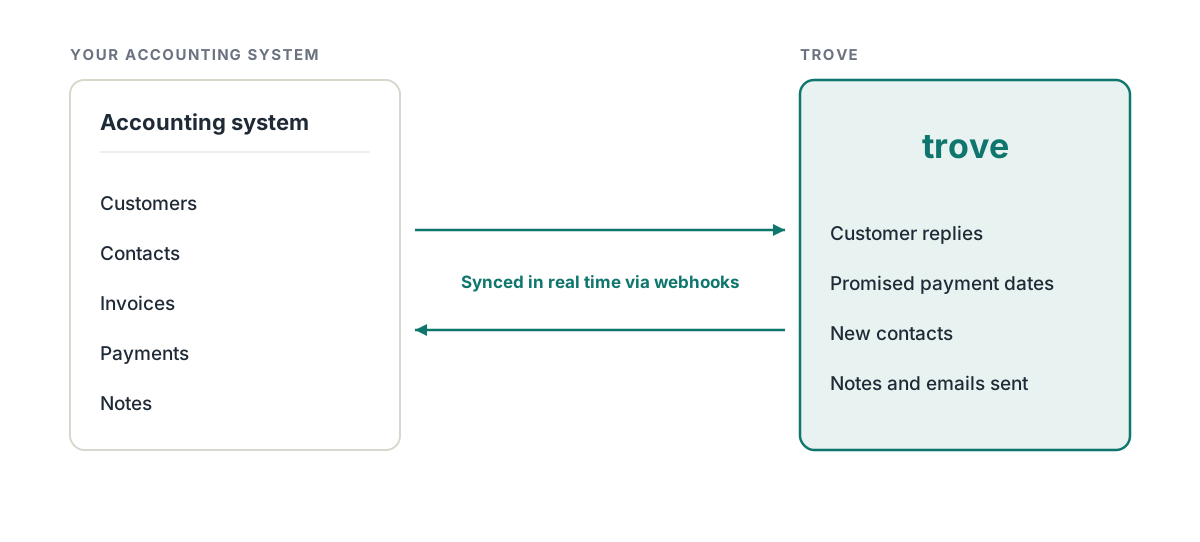
Trove reads data from your accounting system, so chasing always starts from your real numbers.
It writes back too: promised payment dates, new contacts and emails, so your team sees the same picture whether they're in Trove or not.
-
2
Real-time updates
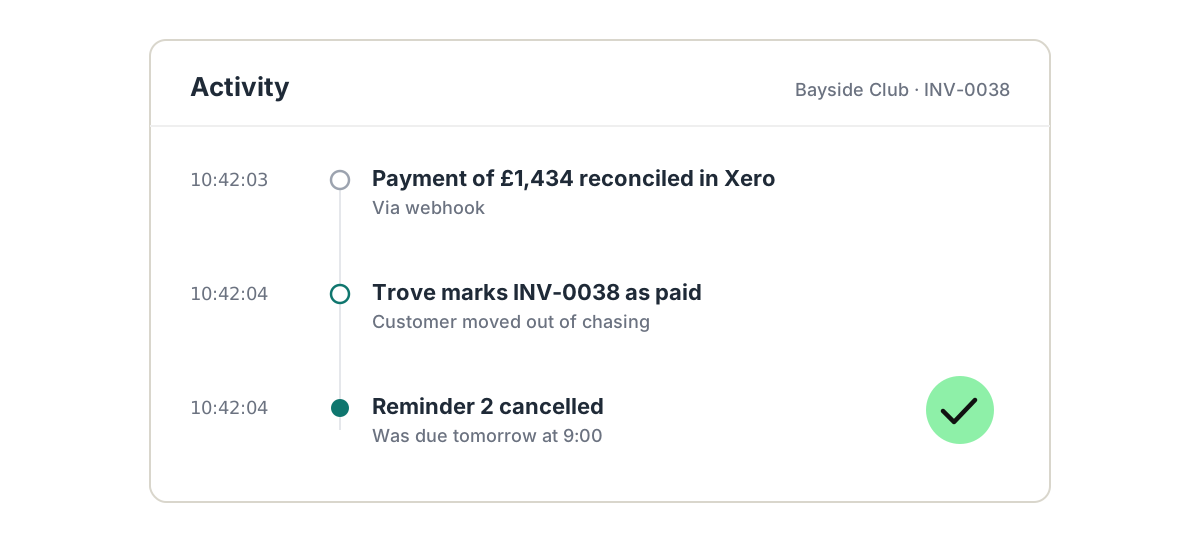
Trove uses webhooks to stay in step with your ledger as things change. When a payment lands or a new invoice is raised, Trove knows straight away.
That means chasing stops the moment a payment is reconciled, avoiding unnecessary reminders.
-
3
Using something else? Custom integrations
Ultimate
If your invoices live in a system we don't list, such as practice, legal or industry software like Actionstep, Infor or Aptean, Trove can build a custom integration on the Ultimate plan. Book a demo and tell us what you use.
-
 Actionstep
 -
 Infor
Infor -
 Aptean
 - Your system
-
Resources on ERP integrations
- Business Central
Microsoft Dynamics 365 Business Central: credit control software compared (2026)
Compare credit control software for Microsoft Dynamics 365 Business Central. Pricing and features for Chaser, Trove and Kolleno side by side.
Read now - Xero
Invoice chasing software for Xero users: three UK tools compared (2026)
Invoice chasing software for Xero compared: Trove £50, Satago £80 and Chaser £199 a month. Who each suits, and when Xero's own reminders are enough.
Read now - Stripe
Best invoice chasing software for Stripe users (2026)
Stripe sends some invoice reminders natively. See what it covers, where the gaps are and three add-ons with prices.
Read now - Multi-entity
How to onboard a group of companies onto Trove, entity by entity
Here's how to onboard multiple entities onto Trove, starting with one and then cloning the process to the remainder.
Read now
ERP integrations: common questions
Everything you need to know
Which accounting systems and ERPs does Trove integrate with?
Trove integrates with Xero, QuickBooks, FreeAgent, Stripe, Microsoft Dynamics 365 Business Central, Sage Intacct, Sage Accounting and NetSuite.
Is the sync two-way?
Yes. Every integration is two-way. Trove reads customers, contacts, invoices and payments, and writes notes, emails, payment dates and contacts back to your system.
Which Trove plan includes my integration?
Xero, QuickBooks, FreeAgent and Stripe are on every Trove plan. Business Central, Sage Intacct, Sage Accounting and NetSuite are on the Advanced plan.
How quickly does Trove see a payment?
In real time. Trove uses webhooks to stay in step with your ledger, so chasing stops as soon as an invoice is paid.
Can Trove write notes back to my ERP?
Yes. Notes and the emails Trove sends are written back to the customer or invoice, so anyone in your accounting system can see the chasing history.
Does Trove integrate with Actionstep, Infor or Aptean?
Yes, through a custom integration on Trove's Ultimate plan. Trove builds custom integrations for practice, legal and industry systems such as Actionstep, Infor and Aptean, so you can chase overdue invoices from the system you already use.
What if my system isn't listed?
Custom integrations are available on the Ultimate plan. Book a demo and tell us which system your invoices live in.
Related features
-
CRM access
Overdue invoices and every chaser on the HubSpot record, with chasing routed by your CRM data.
-
Webhook access
Chasing events sent to Zapier, Make or your own systems, so the rest of your stack keeps up.
-
Multi-entity support
Every company in your group under one login, with each brand chasing on its own.
See it working on your own customers
See ERP integrations in action.
Xero, QuickBooks, FreeAgent and Stripe are on every Trove plan. Business Central, Sage and NetSuite are on Advanced, and custom integrations are on Ultimate.
Last updated