

Summary
- What is credit control software. Software that chases your unpaid invoices for you. Sold as debtor management, dunning or AR automation depending on who is selling it. Jump to what credit control software does
- What it costs. From £8/month for statements only to £650/user/month for enterprise platforms. Most UK small businesses land between £45 and £80. Jump to pricing
- What features to prioritise. Five must-haves and six nice-to-haves. Jump to features
- Credit control software comparison. Ten tools, ratings and reviews for each. Jump to the providers
- How to choose. Three questions: do you need the extras, what is your budget and who is doing the chasing. Jump to how to choose
What is credit control software
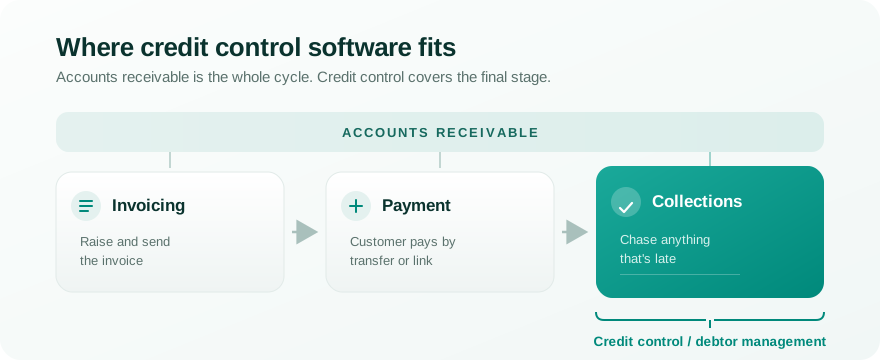
Getting paid has three stages:
- You send the invoice
- Most customers pay
- You chase anything that’s late
Accounts receivable covers all three. Credit control software automates the final stage: chasing down overdue invoices.
Credit control, debtor management, dunning and accounts receivable
The same product gets sold under four names, which can make comparing tools tricky.
| Term | What it covers | Where it’s used |
|---|---|---|
| Accounts receivable (AR) | The whole invoice-to-cash process: raising invoices, taking payment, chasing what’s late | The umbrella term, used everywhere |
| Credit control | Chasing overdue invoices, plus credit risk and limits | Mainly UK |
| Debtor management | Effectively the same as credit control | Mainly Australia and New Zealand |
| Dunning | The automated chasing sequence, usually without the credit risk side | Mainly US, and in software documentation |
Searching for debtor management software or dunning software will surface broadly the same tools as credit control software. Searching for an accounts receivable platform gives you a wider, heavier feature set and a higher price.
Debtor management software
Debtor management software is credit control software under a different name. The term is standard in Australia and New Zealand with the Xero App Store, for example, using “debtor management” as the category name.
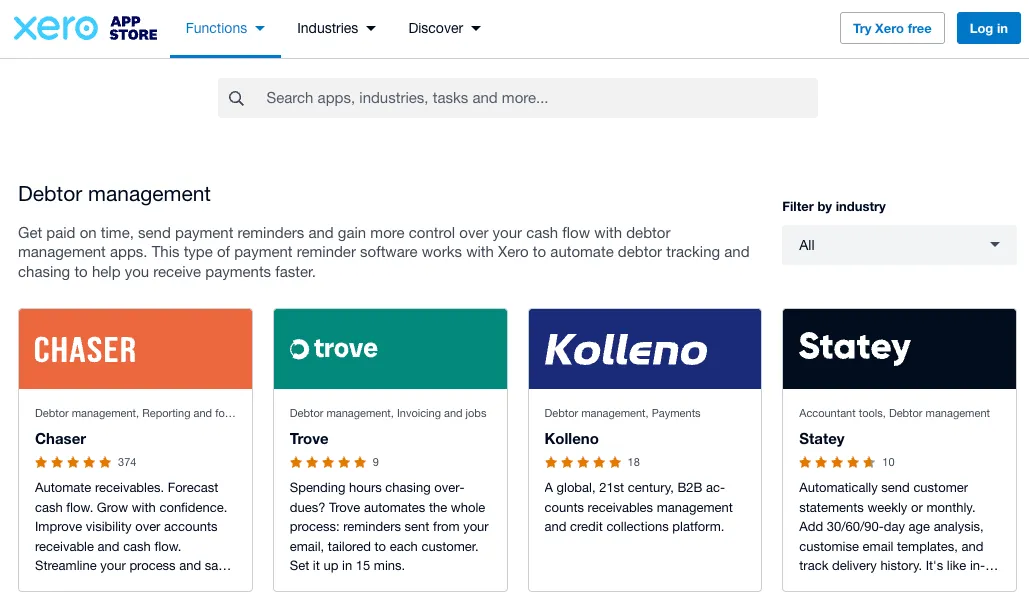
However, there are no major feature differences to look for when compared to credit control software.
Dunning and dunning management
Dunning is most often used in the US to describe the automated chasing sequence: the series of reminders that goes out at set intervals after an invoice falls due.
It’s narrower than credit control. Dunning describes the automated sequence while credit control covers all the work needed to collect the invoice: apply late fees, reporting, payment plans.
Subscription billing platforms like Stripe often sell “dunning” as a feature for failed card payments. For tools sold specifically on the dunning label, see what affordable dunning software costs.
What credit control software costs
Published prices in this category run from £8 a month to £599 per month. The more expensive platforms generally sit in the ‘full AR platform’ band and include invoicing and payments. Some platforms (like Chaser) straddle two bands with two different pricing plans.
| Band | Monthly price | What you get | Tools |
|---|---|---|---|
| Statements only | £8 to £40 | Automated statements with age analysis, no chasing workflow | Statey |
| Credit control focused | £45 to £199 | Reminder sequences, sending from your domain, Xero sync, reporting | Satago, Trove, Credit Hound, ezyCollect, Chaser |
| Full AR platform | £599 to upon request | Invoicing, payments, collections, advanced reporting | Chaser, Kolleno, Upflow |
The top band is worth it if you have a large finance team and want to move all accounts receivable work into one platform. Most SMBs using Xero only need a platform that is focused on credit control as Xero often covers both invoicing and payments.
One example: 4Site Recruitment, a construction recruitment agency, moved off a tool billing them close to £200 a month onto Trove at £50. Days sales outstanding dropped 17% in the first three months, on a fifth of the software spend.
Different pricing models for credit control software
Even if vendors publish their pricing, it might look very different once you apply your specific circumstances. Here are the four models almost every vendor uses and watch-outs for each:
-
Fixed pricing charges the same regardless of your revenue. The only watch out if some features sit on the more expensive plans only so be clear about what you need up front. Examples: Satago (starts at £45, next tier £80), Trove (starts at £50, next tier £135).
-
Per user or revenue band pricing increases as you grow your team or revenue. This means your price could suddenly jump as you add team members or if your revenue takes you into the next band. Examples: Kolleno (£650 per user per month), Chaser (£199 up to £4 million turnover, then £599 for up to £10 million.
-
Percentage of collected revenue can be the least predictable pricing model. Here, the vendor makes more money as you collect more of your invoices. Examples: Lunos.ai charges 0.3% of collected revenue.
-
Quote on request is the last transparent pricing model and suggests that the vendor charges based on revenue band. Examples: Upflow and Paraglide.
If your turnover is high but your margin is thin, size-based pricing costs you disproportionately. Our breakdown of Chaser, Kolleno and Upflow pricing works through what that looks like in practice.
Most tools run some kind of free trial: Chaser offers 10 days, Trove offers 30 and Statey offers 32. A trial tests the things a pricing page won’t tell you: how fast setup actually is, how support responds when something breaks, and whether you recover any money during the trial window itself. Here’s what to test on a credit control software free trial, and which tools offer one.
How to compare credit control tools
Features in this category split into must-have features and nice-to-haves.
Must-haves
- Accounting platform sync. Two-way, so updates flow both directions (e.g. Xero, Stripe, QB).
- Automated chasing. The core job.
- Sending from your domain. Reminders that come from your email address, not the vendor’s. This affects both deliverability and how the message lands.
- Notes and tasks. Somewhere to log everything that isn’t an email.
- Reporting. A clear view of what’s overdue, outstanding and paid.
Nice-to-haves
- Advanced reporting. AR ageing, collections effectiveness index.
- Slack or Teams alerts. Overdue nudges where your team already works.
- CRM integrations. Payment activity linked to customer records.
- Credit limits and risk scoring. Managing exposure per customer.
- Late fee automation. Calculating and raising UK statutory interest and the fixed recovery fee.
- AI drafting and reply handling. Reminders that vary rather than repeating the same template, and replies that get read and actioned.
Which integrations matter depends on your stack. CreditSafe for credit checks, Xero with Outlook and Teams for Microsoft 365, Xero with Gmail and Slack for Google Workspace.
Where AI helps in credit control software
Every tool in this category now claims AI. It is helpful in a few concrete areas:
- Writing reminders that don’t read like a template
- Handling replies from customers
- Flagging accounts whose payment behaviour is deteriorating
Check if vendors cover these areas when buying.
Credit control software comparison: pricing and ratings
Tools here fall into two groups. Chasing-focused tools do collections and little else, and cost less. Full AR platforms handle invoicing and payment as well, and cost more.
| Tool | Best for | Pricing | Rating | Free trial |
|---|---|---|---|---|
| Statey | Automated Xero statements only | £8/mo | 4.6/5 - Xero | 32 days |
| Satago | UK SMBs wanting Experian credit data built in | £45/mo | 4.9/5 - Xero | Yes |
| Trove | UK SMBs on Xero or Stripe automating invoice chasing | £50/mo | 5/5 - Xero | 30 days |
| Credit Hound | Sage users | £51/mo | 5/5 - Sage | Yes |
| ezyCollect | SMBs who want a customer payment portal | ~£98/mo | 4.9/5 - Xero | Not published |
| Chaser | UK mid-market finance teams | £199/mo | 5/5 (Xero) | 10 days |
| Kolleno | Mid-market and enterprise collections teams | £650/user/mo | 5/5 (Xero) | Not published |
| Lunos.ai | B2B AR teams who need AI dispute handling | 0.3% | No reviews | Not published |
| Paraglide | High-volume B2B finance teams | On request | No reviews | Not published |
| Upflow | B2B SaaS and scaling companies, often US | On request | 5/5 (Xero) | Not published |
All pricing accurate at time of publishing.
For the detail on any of these:
- The three heavier platforms head to head, in Chaser, Kolleno and Upflow compared
- The sub-£100 tier, in our guide for UK small businesses
- Xero-specific picks, in the best invoice chasing software for Xero users
- Individual alternatives round-ups for Chaser, Satago, ezyCollect and Statey, plus Credit Hound pricing and alternatives
How to choose
Three questions, in order.
1. Do you need the nice-to-haves yet?
Advanced reporting, CRM integrations and risk scoring sit on higher tiers or heavier platforms. Most small businesses don’t need them yet. If you’re unsure, pick a tool with a real entry-level plan and an upgrade path rather than buying capability you might grow into.
2. What is your budget?
Work out the number you’d actually pay at your volume, not the headline. Per-user and percentage models diverge from the advertised price fastest.
3. Who is doing the chasing day to day?
An owner or director doing it themselves wants something that mostly runs itself, which points to the chasing-focused end - see credit control software for UK small businesses for that shortlist. Once it’s more than one person, coordination becomes the harder problem than reminders - see credit control software for finance teams for that shortlist, and for a large business or corporate group running several entities, credit control software for enterprises covers that separately.
And if nobody owns it, because chasing is one job among several, that’s a different shortlist again. If the person chasing also owns the client relationship, that’s its own problem - see credit control software for agencies.
If you’re still unsure, start at the £45 to £50 entry point with Satago or Trove and upgrade if you outgrow it. Once you’ve picked something, here’s how to roll out automated credit control without losing control of the process.
Frequently asked questions
Is credit control software worth it for a small business? If late payments are costing you time or cash flow, usually yes. If a £50 tool gets invoices paid a week sooner, it pays for itself quickly. If you have a handful of reliable customers and rarely chase anyone, Xero’s free reminders may be enough. Our comparison of software against a manual process covers how to tell when you’ve outgrown them.
What’s the difference between credit control, dunning and debtor management software? Very little in practice. Credit control is the UK term, debtor management is standard in Australia and New Zealand, dunning is the US term for the automated sequence. Accounts receivable is the wider category that also covers raising invoices and taking payment. Compare tools on what they do, not the label.
What’s the difference between credit control software and a debt collection agency? Credit control is the ongoing process of chasing invoices so they get paid on time, done by you or a tool on your behalf, at a fixed monthly cost. A debt collection agency takes over after that’s failed, recovering the debt for a fee or a cut of what they collect, usually 10% to 25% of the amount recovered for commercial debt, more for balances that are older or harder to collect. Software is prevention. An agency is recovery. Good credit control reduces how often you need one.
Does credit control software work with Xero? Most do, through a two-way sync that pulls in invoices and payment status and pushes updates back. If you’re on Xero, treat this as a must-have and rule out anything without it.
Can it charge late payment fees automatically? Some tools can. UK businesses can charge statutory interest at 8% above base rate on overdue B2B invoices, plus a fixed recovery fee of £40, £70 or £100 depending on invoice value. Xero won’t calculate or raise these. Tools with late fee automation work out what’s owed and raise it as a separate invoice. Our guide to UK late payment fees covers how to apply them.
Do I need this if I already use Xero’s reminders? Not always. Xero’s reminders are free and fine for simple needs. You outgrow them when you hit the five-reminder cap, need different schedules per customer, find reminders going to spam or the wrong contact, or want to charge late fees.
Trove handles the collections layer for UK small businesses on Xero: per-customer reminder sequences sent from your own email, replies read and actioned automatically, and UK late payment fees raised straight into your account. It’s £50/month fixed, runs a free 30-day trial, and connects to Xero in about five minutes. Start a free trial or book a demo if you’d like to see it first.