Summary
- The short answer: Xero can’t send segment different customers into separate reminder sequences; it runs one set of reminder for all customers. A tool like Trove adds segmentation on top.
- Why it matters: different customers often need different timing, wording, and a different person chasing them and one global schedule can’t do that.
- The manual workaround: there is a manual step you can take in Xero to make sure certain customers or invoices are not sent the same reminder scheduled as everyone else.
- How Trove does it: it filters customers and invoices by the Xero data you already hold and routes each group into its own workflow, with its own timing, content, sender, and cc’s.
- What you can segment on in Trove: any data that can be read from Xero’s API. For example, what a customer buys (line item), where they are (location), how much they owe (overdue balance), or what kind of customer they are (group).
- Real examples: invoices with different line items chased by the right P&L owner, customers in different US state each managed by their regional owner, and any balance over £1,000 cc’ing the account manager automatically.
Why Xero can’t send different reminders to different customers
Xero’s reminders are an organisation-level setting. You turn them on once, set your schedule, and that schedule runs against every invoice marked as sent. There’s no concept of a customer segment, a rule, or a second workflow. For a deeper look at this, we’ve covered the limitations of Xero invoice reminders and why reminders so often reach the wrong contact in detail.
This isn’t a niche complaint. On Xero’s own product ideas board, businesses have been asking for separate reminder flows for different customer types for years.
- One long-running request for different reminder processes for clients versus customers describes needing both different timing and different email wording for each group.
- Another request to run different reminder pipelines for different contact groups points out that today you can only exclude contacts from reminders, when what people want is to remind them differently.
The demand is clearly there. The feature just isn’t available in Xero.
What businesses actually want to segment on
There are plenty of reasons people may want to send different invoice reminders to different customers. Here are some of the most common cases we have seen at Trove:
- What the customer buys. Different product lines are often owned by different team members. A common request is splitting reminders by line item so that chasers for each P&L come from the team member responsible for it, each with their own workflow. Read how to send different reminders by product or line item.
- Where the customer is. Region changes timing, tone, and often who owns the relationship. A few customers segment by address so each US state, for example, sits in its own workflow with its own team member chasing it. Read how to segment reminders by customer location.
- How much the customer owes. Big balances deserve a different touch to small ones. There routes anyone more than £1,000 overdue into a dedicated sequence that cc’s their account manager. Read how to set up reminders based on overdue balance.
- Something more flexible. We can’t cover every case here and some folks prefer to use the contact groups they have already set up in Xero. Read how to run different reminder workflows for different customer groups.
If your business needs any of these, Xero’s single reminder schedule may not be enough.
The manual workaround available
There is one manual workaround currently available in Xero but it’s clunky:
- Turn off automatic reminders for an invoice or a customer
- Chase the relevant invoices manually via your own email account
- Tracking who’s been contacted in a spreadsheet or in the contact notes.
If you only have a few exceptional cases, manually excluding the contacts or invoices that need different treatment may be enough.
This is the extent of the workaround. You can’t segment by line item, by region, by contact group, or by overdue balance.
How Trove sends different workflows to different customers
Trove connects to your Xero account and lets you filter customers and invoices, then route each group into its own reminder workflow. You can filter on any data field that can read from Xero’s API: the line items on an invoice, the customer’s address or country, the overdue balance, or an existing Xero contact group. Each workflow can have its own timing, its own email content, its own sender, and its own people cc’d in.
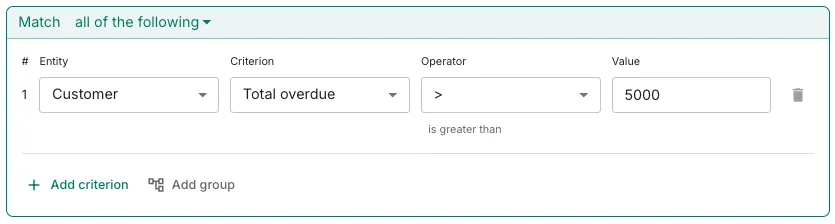
That’s what makes the examples above possible. Line items go to the right P&L owner. Each US state runs on its own track with its own chaser. Anything over £5,000 overdue lands in a sequence that loops in the account manager automatically. The same customer data Xero already holds becomes the thing that decides which workflow each customer lands in.
Here’s how filtering would work for overdue balances in Trove:
If reminders reaching the right person matters to you, it’s worth also reading why Xero sends reminders to the wrong contact, since segmentation and routing tend to solve the same underlying problem.
Try it on your own Xero account
Trove runs a free 30-day trial and takes about 15 minutes to connect to your Xero account. You can start a free trial here or book a demo if you’d like to see how segmentation works before setting it up.