
Summary
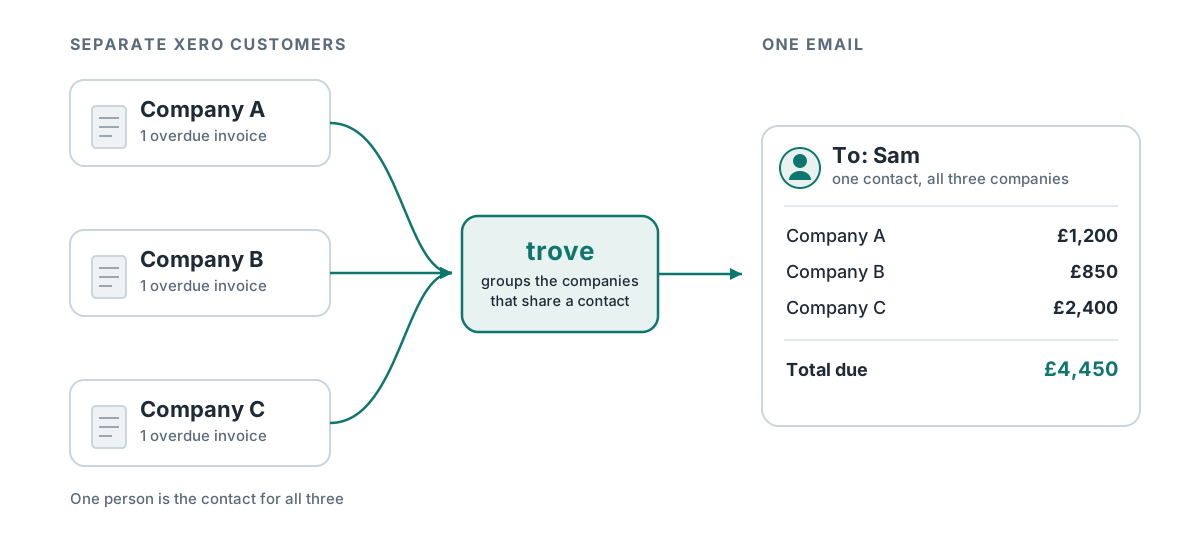
- The short answer: Xero can’t link separate customers, so each company in a group gets chased on its own, even when one person pays for all of them. A parent customer in Trove groups them into one account.
- Why Xero can’t: reminders and statements work one customer at a time, and Xero’s contact groups aren’t connected to either.
- The workaround: pull each company’s outstanding invoices or statement by hand and send one combined email.
- How Trove does it: set a rule, or accept Trove’s suggestions, to group related customers under a parent. The group gets one chasing email, one statement, one balance and one workflow, sent to the contact you choose.
The problem: there’s no parent / sub-entity functionality in Xero
Some of companies have complex setups. A single accounts payable email is often the same contact for a group of related businesses, each set up as its own customer in Xero because each is a separate legal entity.
Raising invoices against each company separately is correct. But when it’s time to chase, Xero treats each one as an unrelated customer meaning the person who handles payment for the group gets a separate reminder for every company (sometimes for every invoice). This is where mistakes start to happen and invoices slip through the cracks.
Why Xero can’t send one reminder to the parent company
Xero’s reminders work at the invoice level and each contact belongs to a single customer. There’s no setting that says “these five customers are in one group, chase them together.”
Xero does have contact groups which you would reasonably expect to help. Unfortunately that’s not the case. A group lets you see the companies together, but you can’t send a statement or a reminder to a group or report on one.
Statements have the same limit. Xero produces one statement per customer, so there’s no way to send a group a single statement showing everything it owes you.
The workaround for sending one group email in Xero
The manual fix is nothing smart: go through each company, download the outstanding invoices and combine them manually into a single email to the shared contact. This is still time consuming.
A better workaround is to download PDF statements from each company. This is still manual but does mean one click per company instead of a click per invoice. Xero’s statements automatically export with links to each invoice so the customer can still get the documents they need.
How parent customers work in Trove
A parent customer sits above the separate Xero customers that belong to it. Nothing changes in Xero - every invoice still belongs to the right legal entity - but Trove treats the group as one account when it comes to chasing.
Setting up parent customers
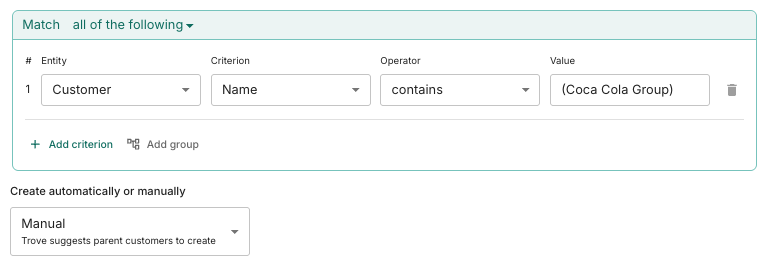
You tell Trove how to spot companies that belong together either using a rule or manually. The most common rules are customers who have the same name or share the same contact group. You can combine several criteria in one rule.
Then choose how groups get created. On automatic, Trove creates the parent customers for you. On manual, Trove suggests the parent customers it’s found and you confirm them.
Here’s an screenshot of the feature where several Xero contacts have (Coca Cola Group) in them.
What changes once customers are grouped
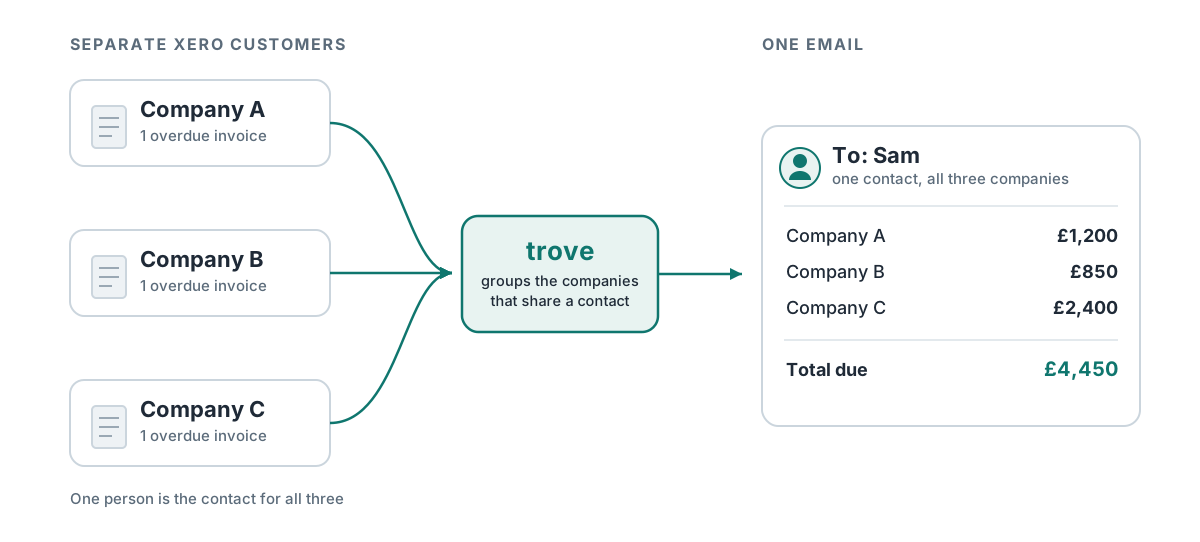
- One chasing email. The contact gets a single email listing every overdue invoice across the group, organised by company, instead of a reminder per company.
- One statement. A single statement is sent covering every company in the group.
- One balance. The group’s total balance and overdue amount are summed for your reports.
- One workflow. The whole group follows the same chasing workflow, so timing and tone are consistent across every company.
Choose who to chase for the parent customer
The person who pays often isn’t named on any of the invoices. You choose the contact for each parent customer, so the chase goes to whoever approves payment for the group, usually someone in the holding company’s accounts payables team. The individual company contacts on each invoice aren’t chased.
Example: invoicing each plant, chasing the holding company
One business using Trove invoices car plants. Each plant is its own limited company, so every invoice has to be raised against that individual plant. In Xero, that makes every car plant a separate customer.
Nobody at the car plants pay the bills though - the holding companies do. The business had to set up parent customers for each set of related car plants to chase down unpaid invoices. End result: the holding company gets one chase and one statement for all the related car plants, sent to the person who actually pays.
Who parent customers help most
Parent customers are worth setting up whenever one person pays for several of your Xero customers:
- Holding companies and their subsidiaries, where head-office accounts pays for the whole group.
- Fleets, in shipping and logistics, where each vessel, vehicle or route is its own limited company with one back office settling the invoices.
- Manufacturers with several plants set up as separate companies.
- Franchises and multi-branch businesses, where one owner covers several sites.
- Any group where one accounts payable contact handles invoices spread across separate legal entities.
Parent customers vs sub-customers
Parent customers are important when one customer has several entities, and each entity is its own Xero customer. Sub-customers are the opposite: one Xero customer in which several people are invoiced and chased separately. Common examples are departments, sites or projects.
| Parent customers | Sub-customers | |
|---|---|---|
| What it does | Merges several Xero customers into one account | Splits one Xero customer into several |
| Who needs this (examples) | Holding company and subsidiaries, fleets, franchises | Departments, sites or projects inside one client |
| Who is chased | The contact you choose for the group | Each sub-customer’s own contact |
| Workflow | One workflow for the whole group | Its own workflow per sub-customer |
| Statements | One statement for the group | One per Xero customer by default, or one per sub-customer |
For the other direction, see how sub-customers let you chase each department separately.
Running several companies yourself, rather than invoicing a customer that does? That’s a different setup: see running credit control across multiple entities in Xero.
FAQ
Can you create a parent customer in Xero?
No. Xero has no parent and sub-customer structure. Every legal entity you invoice is its own customer, and contact groups only let you view them together. QuickBooks has sub-customers built in, but Xero doesn’t.
Can Xero send one statement to a group of customers?
No. Xero produces statements one customer at a time, and you can’t send a statement to a contact group. You’d need to download each company’s statement and combine them yourself, or use a tool that groups customers.
Does grouping customers in Trove change anything in Xero?
No. Invoices stay against each company in Xero. Trove only changes how the group is chased, which statement it gets and how it shows up in your reports.
Which Trove package includes parent customers?
Parent and sub-customers are included on the Integrated package (£135/month) and above, and you can try Integrated free for 30 days.
Chase the group as the one customer it is
Parent customers are part of Trove’s Integrated package (£135/month), and Integrated comes with a free 30-day trial. Trove connects to Xero in about 15 minutes and reads your customers straight in, so you can set up your first parent customer the same day. Book a demo to see parent customers set up on your own customer list.