
Summary
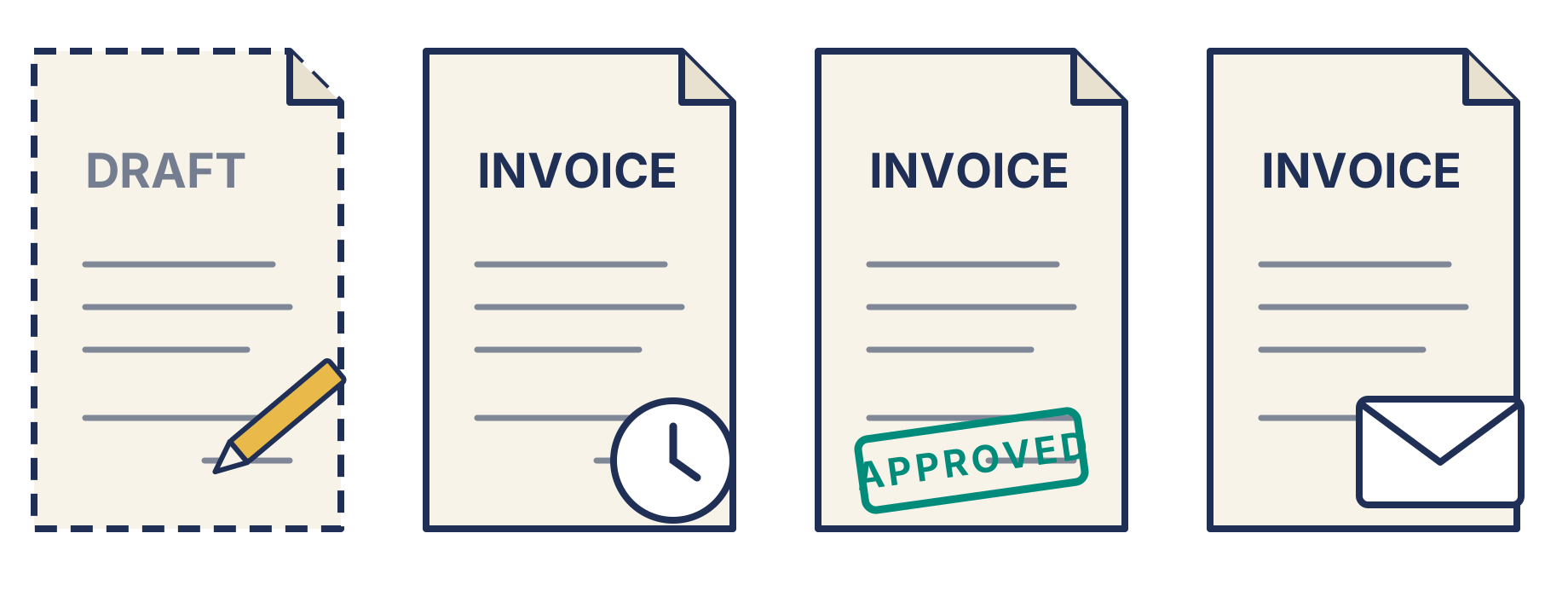
- A Xero sales invoice moves from draft, to awaiting approval (only if your team uses approvals), to awaiting payment, to paid. Approving an invoice is what posts it to your ledger.
- Xero only chases invoices that are approved and marked as sent. Drafts, invoices awaiting approval and approved but unsent invoices get no reminders.
- The PO number goes in the Reference field, and draft is the cleanest stage to add it.
- Trove works from drafts as well as approved invoices, and can write the PO into the Reference field on either. For a draft, it asks for the PO, writes it into the Reference field, then approves the invoice and sends it to accounts payable before the due date, all from your own email account.
The statuses a Xero invoice moves through
- Draft. Created but not approved. Fully editable, can be deleted, not posted to your ledger and not on your aged receivables report.
- Awaiting approval. Someone has submitted the invoice for approval, usually a user who can create invoices but not approve them. It’s still not posted and still editable.
- Awaiting payment. Approving the invoice posts it to your ledger, and it becomes a real receivable. Xero also calls this approved or authorised. Until you send it or mark it as sent, the customer hasn’t seen it.
- Paid. Fully settled.
“Sent” isn’t a status of its own. It’s a flag on an approved invoice that is awaiting payment that shows it has been as sent. Xero’s reminders only start once it’s set. An approved invoice can’t be deleted, only voided, so any fix after approval means editing the invoice or voiding it and starting again.
Getting a PO at the draft invoice stage
Keeping an invoice in draft until you receive a PO is the cleanest approach. Once received, the PO goes into the Reference field, you approve and send, and the invoice arrives ready to match. Here’s where to put the PO number on a Xero invoice, and what to do if you already use Reference for something else.
The catch is that Xero ignores drafts. Nothing reminds you or the customer, so an invoice waiting on a PO can sit in drafts for weeks. If you’re doing this manually, keep your own list of which drafts are waiting on a PO and who you’ve asked.
Getting a PO while an invoice is awaiting approval
If your team uses approvals, this is a useful checkpoint. Whoever approves invoices can check that every PO customer has a PO in the Reference field before anything is posted, and send the invoice back if not.
Getting a PO on an approved but unsent invoice
The invoice is on your books, but the customer hasn’t seen it. It’s the last easy moment to add or correct the PO before it goes out.
Getting a PO on an approved and sent invoice
Often the invoice is out before anyone notices the PO is missing or wrong. You don’t have to void it and start again. As long as no payment has been applied, you can edit the invoice, add the correct PO to the Reference field and send it again.
How Trove collects PO numbers at each stage
Trove works from your draft invoices and your approved ones.
For drafts, Trove runs the whole process. Ten days before the due date by default, it sends the draft to the customer’s accounts payable team. If they need a PO, Trove asks the person at the customer who holds it, writes the PO into the Reference field on the draft, then approves the invoice in Xero and emails it to accounts payable. Every email goes from your own email account, not from Trove. Next time, it goes to that PO contact first. The full process is set out step by step here.
For approved invoices, whether or not Xero marked them as sent, Trove sends a pre-due reminder from your own email address to whichever contact holds the PO. When the PO comes back, Trove writes it into the Reference field and sends the updated invoice to accounts payable.
If the Reference field already has something in it, Trove asks you what to do rather than overwriting it.
Draft is still the tidiest home for PO customers’ invoices, because the invoice reaches accounts payable once, already carrying the PO.
Trove runs a free 30-day trial and takes about 15 minutes to connect to your Xero account.