Summary
- The short answer: Xero can’t vary reminders by product line; it sends one reminder per invoice from one address. Trove can route each line item separately.
- Why Xero can’t: reminders follow one organisation-wide schedule that ignores what’s on the invoice, so a mixed invoice still gets one reminder to one contact.
- The workaround: chase one line item in Xero and turn reminders off for the others. They can be chased outside of Xero.
- How Trove does it: it reads the line items on your invoices and segments them into the correct workflow, with the right owner, timing and wording.
- Example: a few Trove customers split chasing by P&L so each product line’s reminders come from the team member who owns it.
Why Xero can’t vary reminders by product line
Xero’s reminders use one organisation-wide schedule that applies to every sent invoice.
More granular segmentation is a long-standing request. On Xero’s product ideas board, businesses have asked to set different invoice reminders for different invoice types, describing exactly this problem: memberships, sponsorships, and reimbursements that each need different reminder treatment. Xero’s product team replied that reminders at that level aren’t something they’re adding for now.
For the wider picture of what Xero’s reminders can and can’t do, see the limitations of Xero invoice reminders.
The manual workaround in Xero
The only option currently available is to use Xero’s built-in reminder system for one line item only. If you prioritise the line item with the most late payers, you can then turn off reminders for all other customers. They can be chased outside of Xero’s system.
This still gives you the functionality of Xero’s built-in reminders, just in a more limited capacity. For more information on how to turn Xero’s built-in reminders on and off for different customers, see our guide here.
How Trove routes line items to the right owner
Trove reads the line items on your Xero invoices and lets you segment each invoice into the correct workflow. Hardware invoices can run on the hardware team’s sequence and send from their email address. Services invoices can run on the services team’s sequence and send from theirs. Each workflow has its own timing, wording, sender, and anyone you want cc’d in.
Here’s an example of what this looks like in Trove’s workflows:
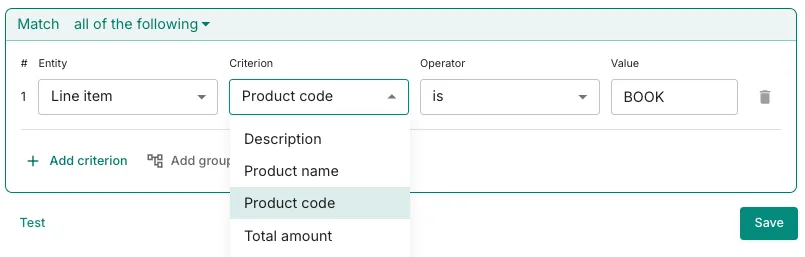
Once set up, new invoices will always route into the correct workflow if they match the workflow’s criteria.
This is one of several ways to segment customers into different workflows. For the full picture, start with whether you can send different Xero reminders to different customers, or see how the same idea works when you segment by customer location.
Try it on your own Xero account
Trove runs a free 30-day trial and takes about 15 minutes to connect to your Xero account. You can start a free trial here or book a demo if you’d like to see it set up first.