

Summary
- Trove is credit control software for growing UK finance teams. Its parent customers group several ledger accounts into one account to chase, and its sub-customers split one account into sites, each with its own contact and workflow.
- Chase a customer group’s head office with one group statement when head office pays centrally and approves invoices itself.
- Chase site by site when each site approves its own invoices or holds its own budget.
- Most customer groups need both: one statement to the person who pays, showing each site’s invoices separately, and a contact at each site for queries.
- Give the whole group one owner on your side, so head office and a store manager aren’t chased about the same invoice on the same day.
- Nothing in your ledger has to change. Invoices stay against the site or company you raised them to.
Head office or site by site: how to decide
Ask who approves an invoice, not who pays it. Head office may release the money, but if a store has to sign off the delivery first, chasing head office alone won’t move an invoice the store is sitting on.
| Deciding factor | Points to head office | Points to each site |
|---|---|---|
| Who approves the invoice | Central accounts payable matches invoices to orders and approves them | The site manager has to confirm delivery or sign off the invoice first |
| Who pays | One payment run from head office covers every site | Each site pays from its own account or card |
| Where the budget sits | A central purchasing budget | Each site holds its own budget and raises its own orders |
| Who raises queries and disputes | Head office handles queries about price and terms | Sites raise queries about deliveries, shortages and damaged goods |
| Where remittances come from | One remittance from head office lists invoices for several sites | Each site sends its own payment and remittance |
| Who the PO comes from | Head office raises one PO, or a PO per site, centrally | Each site raises its own POs |
If most of your answers sit in the middle column, chase head office. If most sit on the right, chase each site. If they’re split, which is common for chains, chase both, with a clear job for each: head office gets the statement and the payment chaser, and sites get the queries about their own deliveries.
What a head office statement with site-level lines looks like
A group statement works when the person at head office can see, in one glance, which site is holding up which invoice. Grouping the lines by site does that. One long list sorted by invoice number doesn’t.
| Invoice | Invoice date | Due | Amount | Status |
|---|---|---|---|---|
| Leeds (Store 014) | ||||
| INV-2201 | 4 Sep | 4 Oct | £620.00 | Query open at site |
| INV-2214 | 15 Sep | 15 Oct | £1,180.00 | Overdue |
| Total for Leeds | £1,800.00 | |||
| York (Store 022) | ||||
| INV-2205 | 8 Sep | 8 Oct | £410.00 | Query open at site |
| Total for York | £410.00 | |||
| Total for the group | £2,210.00 | |||
Four things make it work:
- Group by site, oldest invoice first within each site, so the longest-overdue items are at the top of each block.
- Use the customer’s own site reference, such as a store number or depot code, as well as the town. That’s how their accounts payable team looks things up.
- Show the PO number if the customer uses them. A missing PO is the most common reason a site’s invoice sits unpaid. Here’s how to get the PO number before the invoice is due.
- Mark lines with an open query, so head office pays the rest instead of holding the whole statement.
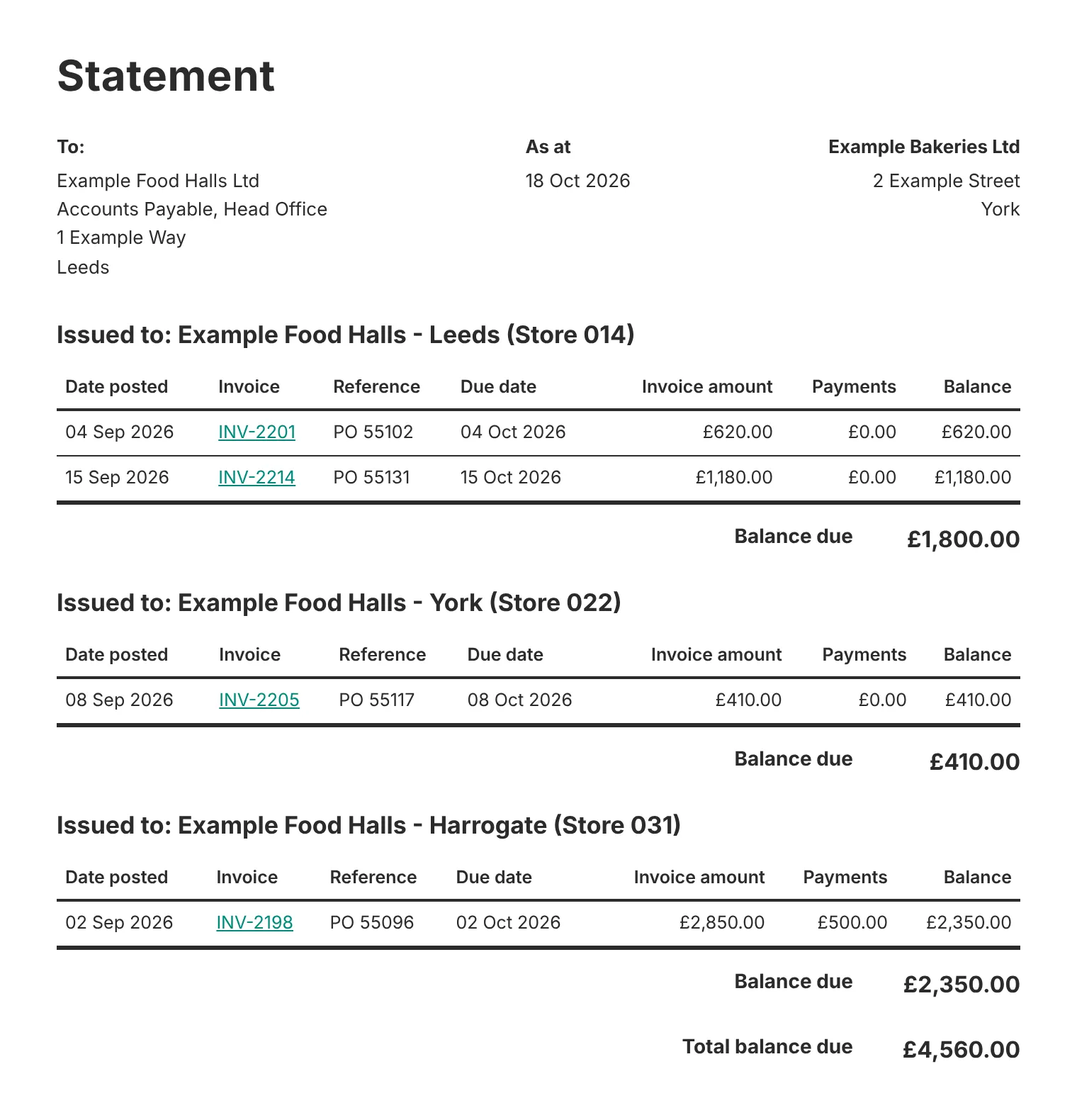
Trove’s statement for a parent customer groups the lines by site in the same way. Each site’s invoices sit in their own block with that site’s balance due, and the total for the group comes at the end.
Running head office and site chasing without sending the same reminder twice
Double-chasing is the risk with a group. Head office gets a statement on Monday, a store manager gets a reminder about the same invoice on Tuesday, and both forward it to each other.
- Name one payer contact for the group. Usually the head office accounts payable inbox. Statements and payment chasers go there and nowhere else.
- Name a contact at each site for queries. Sites hear from you only about their own invoices, and only when you need something from them, such as a signed delivery note.
- Give the group one owner on your side. One credit controller sees both conversations and decides who gets the next email.
- Pause chasing on an invoice while a site has a query open. Keep chasing head office for the rest of the balance.
- Time the statement before the payment run. If head office pays on a fixed date each month, send the statement a week before it, so there’s time to approve everything.
An accountancy practice on a demo call with us in October had the same problem. One of its clients is six companies, and it wanted to chase all six companies’ outstanding invoices in a single email.
Worked example: a 12-store group, two stores with queries
Example Bakeries Ltd supplies Example Food Halls Ltd, a group of 12 stores. Each store is its own customer account in Example Bakeries’ ledger, because each store orders and receives its own deliveries. Head office pays everything in one payment run on the 25th of each month.
Sam runs credit control at Example Bakeries. On 18 October, six of the stores have overdue invoices, £14,860 in total across nine invoices. Two have open queries: the Leeds store says one delivery was short (£620), and the York store has queried a price (£410).
| Who | What they get on 18 October | Why |
|---|---|---|
| Ben, accounts payable at head office | One statement for the group: nine invoices, grouped by store, £14,860 in total, with the Leeds and York lines marked "query open". The covering email asks for £13,830 in the 25 October run | Head office pays, so the payment request goes to Ben only |
| Asha, Leeds store manager | An email about INV-2201 only, attaching the signed delivery note and asking her to confirm the delivery | Only the store can confirm what arrived |
| Dan, York store manager | An email about INV-2205 only, with the agreed price list | The query started at the store |
| The other four stores | Nothing | Their invoices are on Ben's statement. Chasing them too would be double-chasing |
The two queried invoices stay off the payment request, so Ben can approve the other seven without waiting for the stores. Once Asha confirms the delivery and Dan accepts the price, Sam adds both invoices to the next statement, ahead of the November run. If either query turns into a credit, Sam raises a credit note against that store’s account and the statement updates.
Setting up a customer group in your credit control system
How you set this up depends on how the customer sits in your ledger. Nothing in the ledger has to change either way.
- Each site is its own customer account. Group the accounts under a parent customer. In Trove, a parent customer gets one email listing every overdue invoice across the group, and one statement with each company’s invoices listed separately, sent to the contact you choose. Here’s how parent customers work for a group of companies in Xero.
- All sites sit under one customer account. Split the account into sub-customers, one per site. In Trove, each sub-customer gets its own contact, its own workflow and, if you want, its own statement. Here’s how sub-customers chase different contacts in the same company.
Both are part of Trove’s parents and sub-customers feature, on the Integrated and Advanced plans. If you’d rather keep sending statements on a schedule yourself, here’s how to automate statement sending in Xero.
This is different from running credit control across your own group of companies. If the several entities are yours, not your customer’s, see multi-entity credit control.
FAQs about chasing customer groups
Should I chase head office or the branch for an unpaid invoice?
Chase whoever approves the invoice. If head office approves and pays centrally, chase head office. If the branch has to sign off the invoice or holds its own budget, chase the branch, and send head office the statement.
Can a group of companies get one statement?
Yes, if your credit control system can group customer accounts. Xero produces one statement per customer, but in Trove a parent customer gets one statement covering every company in the group, with each company’s invoices listed separately. Read more about how Trove’s parents and sub-customers work.
How do I chase a customer with several sites?
Send payment chasers to the one contact who pays, and site queries to a contact at each site. Group the statement by site so the payer can see which site is holding up which invoice, and pause chasing on any invoice with an open query.
How do I stop chasing a site and head office about the same invoice?
Give the whole group one owner on your side, and decide which contact gets which kind of email. Payment chasers go to the payer only. Sites hear from you only about queries on their own invoices.
Trove runs a free 30-day trial. You can start a free trial here or book a demo if you’d like to see a customer group set up with your own ledger first.